Open in
Registration and nationality
Read the reason Football Manager gives for the player's ineligibility. Registration, work permits, foreign-player quotas and home-grown rules are separate checks.
Why can't I register this player?
| Problem | Start with |
|---|---|
| Registration window closed | Register a player after the window closes |
| Continental squad registration missing | Check that competition's registration type |
| Italian non-EU quota | The Serie A steps below |
| Work permit required | Give the player a work permit, or check the nation's work permit rules and the competition's own rules |
| Appearance limit or other eligibility rule | Record the exact competition and message |
| Too few home-grown players | Check training-history requirements, nationality alone is not enough |
Serie A non-EU quota example
Before signing the player:
- On Information, clear Treated as non-EU in Italy.
- In Relationships, add Italy as another nationality and save.
- Complete the signing in Football Manager.
- Register the player if required.
This targets the Italian quota. Other eligibility rules still apply.
Register a player after the window closes
Choose one of these options:
| Option | What it does | Use it when |
|---|---|---|
| Allow Squad Registration Anytime | Lets you register players on the game's own registration screen at any time. | You want to keep registering players in Football Manager. Start here. |
| Add a Competition Registration record | Registers one player for one competition type from FMRTE. | You need one player registered, or the game's screen still refuses. |
| Apply a registration preset | Registers a group of players for their current team. | You need a whole squad or several new signings registered. |
| Move the registration dates | Changes when the game opens and closes registration. | You want registration open again for every club. This is experimental. |
A Domestic registration does not cover continental cups. Register the player for each competition type they need.
If the game says the squad is full, the window is not the problem. Raise the limit in the competition's Squad Registration rules instead.
None of these options opens a transfer window. To sign a player outside the window, see Outside the Transfer Window.
Allow Squad Registration Anytime
This is an option on your manager, not on the player or the competition.
- Open Favorites → Profile.
- On Information, tick Allow Squad Registration Anytime.
- Select Save Changes.
- Register the player on the competition's screen in Football Manager.
- Check that the player appears in its registered squad.
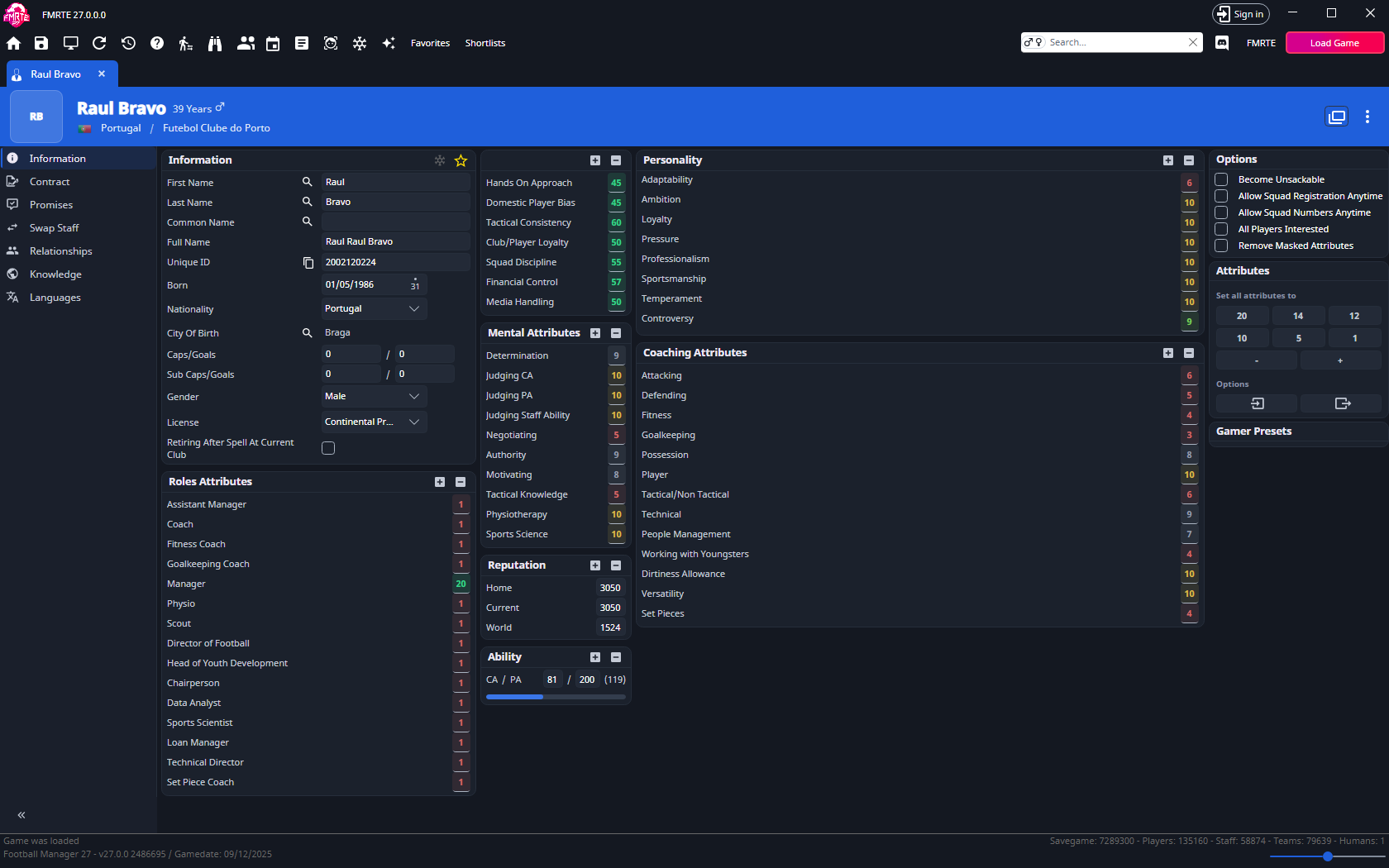
Squad numbers: tick Allow Squad Numbers Anytime as well, then edit Number on the player's Contract page.
Add a Competition Registration record
This writes the registration onto the player, without using the game's registration screen.
- Open the player's Relationships tab.
- Select +.
- Set Type to Competition Registration.
- In Registration, choose the competition type, such as Domestic, UEFA or Libertadores.
- Use the search button next to Team to choose the player's team.
- Select Save Changes.
- In Football Manager, check that the player appears in that competition's registered squad.
If the player still isn't registered, look in the same list for a Competition Unregistration record of that type and team, then see A new signing still will not register. See Relationships for the other record types.
Apply a registration preset
A registration preset gives each player a Competition Registration record of one type for their current team. If the player already has a record of that type, the preset updates it. Players without a current team are skipped.
For UEFA, use the built-in RegisterForUefa player preset. For the other types, create your own:
- Open Preset Manager and create a player preset.
- Add an action.
- Set Action Type to Execute custom action.
- Set Type to one of these:
- Register for Domestic competitions
- Register for UEFA
- Register for Libertadores
- Register for Club World Championship
- Register for MLS
- Register for North American Champions League
- Save the preset.
To apply the preset:
- One player: right-click the player's row and open Presets... → Players.
- A group: use Mass Edit → Presets → Preset(s) to apply. See Apply a preset to a group.
Then check the registered squad in Football Manager. For a competition type that has no preset action, add a Competition Registration record by hand instead.
Move the registration dates
With experimental features on, you can change when registration opens and closes. These changes affect every club, not only yours.
- A competition with its own dates: move its Squad Registration Periods.
- A league that follows the nation's transfer windows: move the windows on the nation's Transfer Rules tab. Only a window with Squad Registration ticked opens registration, and you can't change that column.
After you save, follow the steps in Finish the changes.
AFC, Libertadores or Sudamericana registration is missing
Registration actions include named AFC, South American, Oceania, African, domestic-cup, youth and women's continental types, in addition to UEFA, Libertadores and Domestic. Choose the named type that matches the competition. A domestic registration does not register a player for every continental cup.
If the game still rejects the player, record the competition, season, eligibility message and selected type in a support report.
A new signing still will not register
Stale registration records can require a specific repair. Do not clear all relationships or appearance history: those records may still be needed.
There is no confirmed workaround here for the Brazilian seven-match rule. Ask support about the exact restriction.