Open in
Cloning a player with the Clone Center
The Clone Center tab on a player's page copies that player onto other players. It does not create a new player: every player you add under Players to Replace keeps their place in the game, and their own values are overwritten with the open player's.
To copy a saved profile from a file instead, use Export and Import.
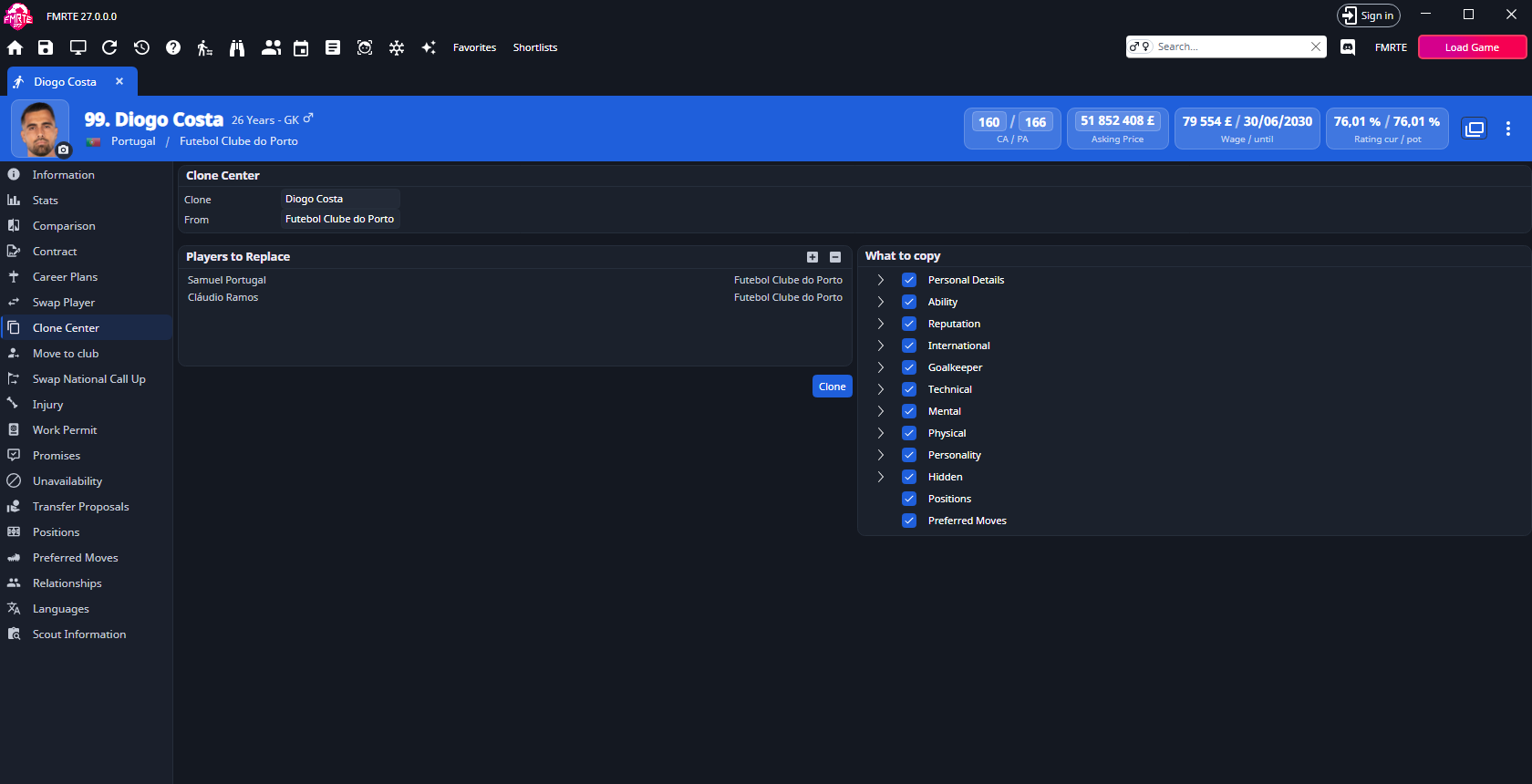
Clone a player
- Open the player you want to copy and select Clone Center.
- Check Clone and From. They show the open player and their club, or Free Player.
- Under Players to Replace, select + and search for a player to overwrite. Repeat for each player.
- Under What to copy, clear anything you want the players on the list to keep.
- Select Clone.
- Look for All the players on the list were successfully cloned, then check the players in Football Manager.
Clone writes straight away. There is no confirmation step, so check the list and the tree before selecting it.
Players to Replace
The list shows each player's name and club.
- + (Add) opens the player search. Adding the open player, or a player already on the list, does nothing.
- − (Remove) removes the selected player from the list. It does not change the player.
Clone is available once the list has at least one player. After a clone the list is emptied.
What to copy
Everything starts ticked. Tick or clear a group to change all its fields, or expand it to choose single fields. A group box shows a mixed state when only some of its fields are ticked.
| Group | What it copies |
|---|---|
| Personal Details | First, last and common name, date of birth, city of birth, nation, height, ethnicity, skin colour, hair colour and length, asking price, morale, days in the country and retiring. |
| Ability | Current and potential ability. |
| Reputation | World, current and home reputation. |
| International | International caps and goals, and under-21 caps and goals. |
| Goalkeeper | The goalkeeping attributes. |
| Technical | The technical attributes. |
| Mental | The mental attributes. |
| Physical | The physical attributes, including left and right foot. |
| Personality | The personality attributes. |
| Hidden | Consistency, dirtiness, important matches, injury proneness and versatility. |
| Positions | Every position rating. |
| Preferred Moves | The player's preferred moves. |
What is never copied
- The date a player joined their club. Each player keeps their own.
- The city of birth, when the open player has none. The other player keeps theirs.
- Anything outside the tree, such as club, contract, statistics, relationships and languages.
Each cloned player's rating is recalculated the next time it is read.
Save and undo
Saving the page while Clone Center is open does the same as Clone: if the list has players, they are cloned.
Adding a player and cloning need a valid licence. Without one, FMRTE asks you to activate first.
A clone appears in Edit History as one entry that cannot be undone. To go back, change the values on each player again.