Open in
Player statistics and league comparisons
Open a player and select Stats to read their season in Overview, Season detail and League ranks. This section is read-only. Changing its filters does not edit the player or require Save Changes.
Stats reads the Windows, macOS, Console and Microsoft Store editions of the game. Check supported platforms and game versions for your build.
Start with Overview
- Load your savegame, then open a player.
- Select Stats → Overview and let the figures and comparisons finish loading.
- Choose All comps, League, Cup, Continental or Intl.
- Under Compare with, choose the top 20 leagues plus the player's own league, or the player's own league.
- Choose Position and check the comparison population and minutes threshold shown beside the profile.
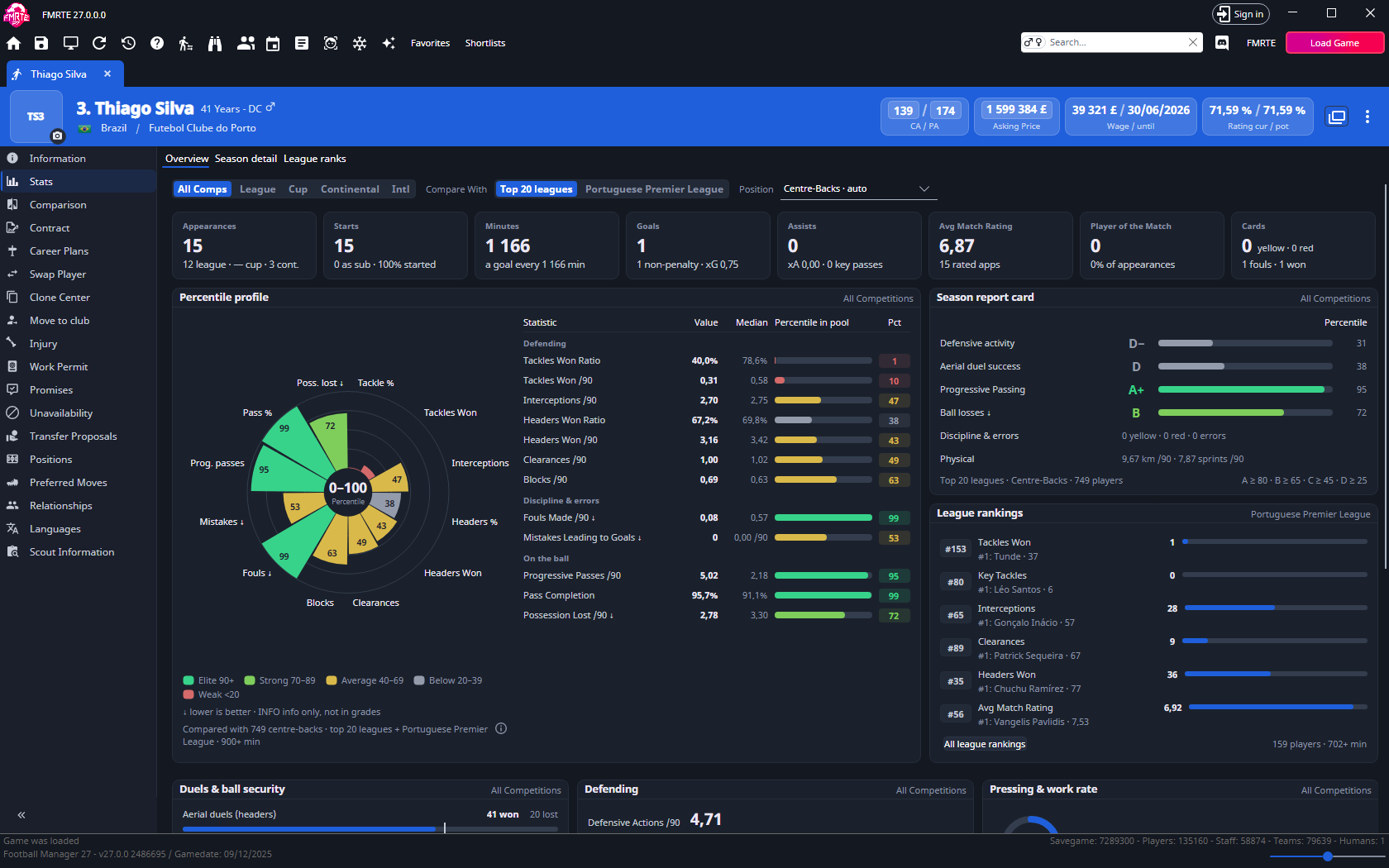
All comps uses Football Manager's overall-club season record. It does not add the other visible scopes together or include international figures. The scope chips change the tiles, profile, report card and story cards. Minutes & rhythm always describes the whole season, and Overview's league rankings always describe the player's league.
Position starts with the player's automatically classified role. Choosing another role changes the comparison population and the statistics used in the profile, report card and six league-ranking rows. Broader position groups and all positions are also available. Read the population label after changing a filter: a percentile depends on who the player is compared with.
Read the percentile profile
The rose chart uses a fixed 0–100 scale. Longer wedges mean higher percentiles among the eligible comparison players. The rows beside it show the player's value, the comparison population's median and the percentile. The median is the typical comparison value, with half of the eligible values on either side.
FMRTE compares rates per 90 minutes where applicable. A ↓ marks a statistic where a lower value is better, such as possession lost or fouls. A low value can therefore earn a high percentile. INFO marks an ungraded statistic: its available percentile can be shown, but it is not graded on the report card.
| Percentile | Tier |
|---|---|
| 90 or higher | Elite |
| 70–89 | Strong |
| 40–69 | Average |
| 20–39 | Below |
| Below 20 | Weak |
The centre of the rose only labels the 0–100 scale. FMRTE does not show an overall average. Hover a wedge to see how much of the comparison group the player is above or below, the sample size and any minimum number of attempts. Percentiles are separate from Football Manager's average match rating and the player's CA/PA.
Read the report card and story cards
Each report-card line grades one named statistic by its percentile, shown under Percentile: for example, Scoring uses non-penalty goals per 90, Goal threat non-penalty xG per 90 and Chance creation xA per 90. Letters use A from 80, B from 65, C from 45, D from 25 and F below 25. Plus and minus marks divide each band into thirds. A line without enough data shows —. Discipline and physical lines show values without a grade. Hover a line for its exact statistic, value and comparison. These grades are FMRTE summaries, not Football Manager awards or a validated player-quality score.
Story cards explain finishing, creation, duels, ball security, work rate and defending. Their order follows the selected comparison position. On finishing and creation bars, the white mark is xG or xA. On other bars and rings, a tick marks the comparison population's typical value. Hover abbreviations and labels for their descriptions.
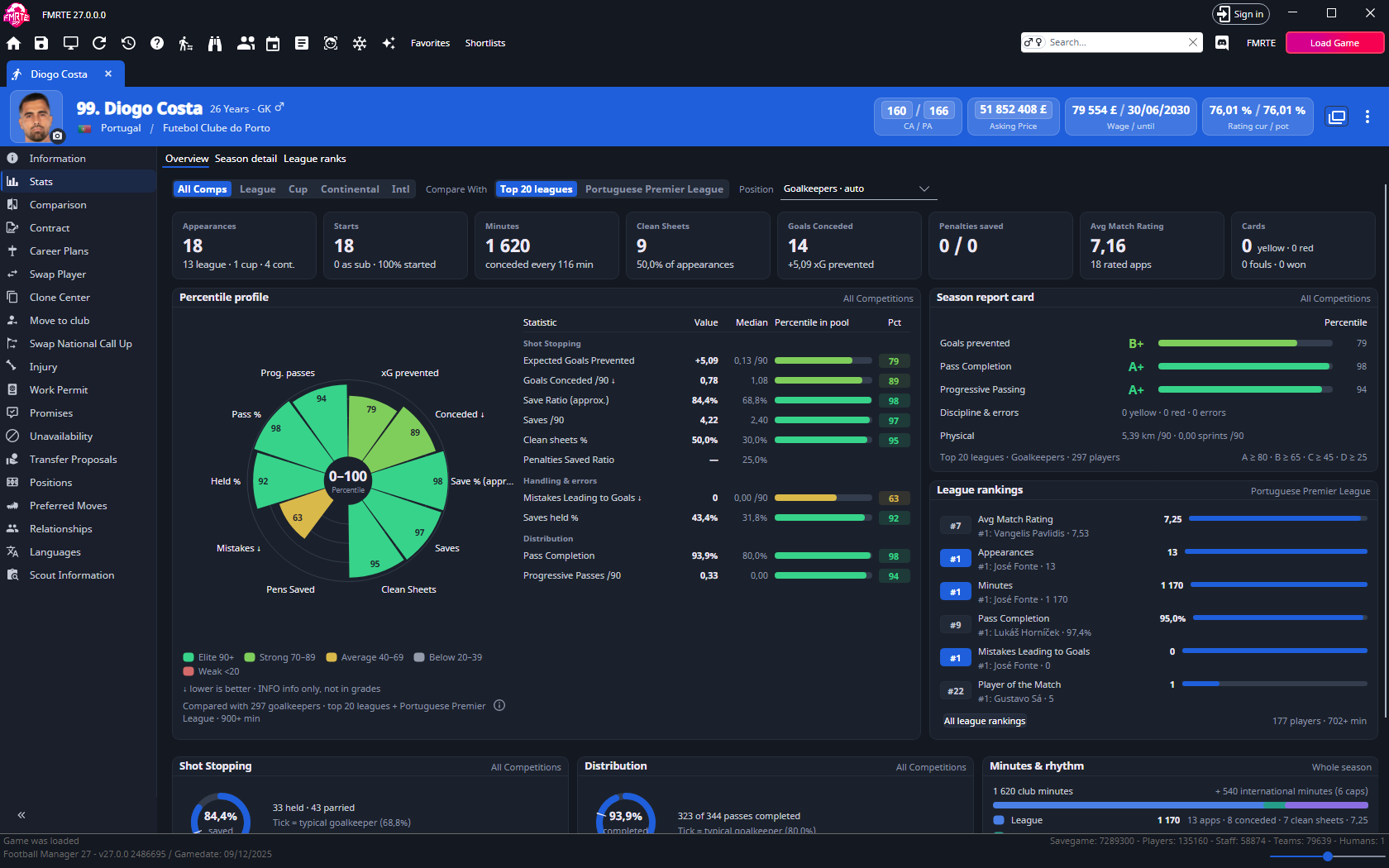
Goalkeepers have shot-stopping and distribution figures, with clean sheets, goals conceded and penalties saved in the tiles. Their saves and save ratio are approximate because tipped saves are not read.
Explore Season detail
- Select Season detail.
- Choose Totals or Per 90.
- Compare All comps with the League, Cup, Continental and Intl columns.
- Use Find a statistic to narrow the rows, and collapse group headings when needed.
- Use Columns to show the Non Competitive scope, which starts hidden.
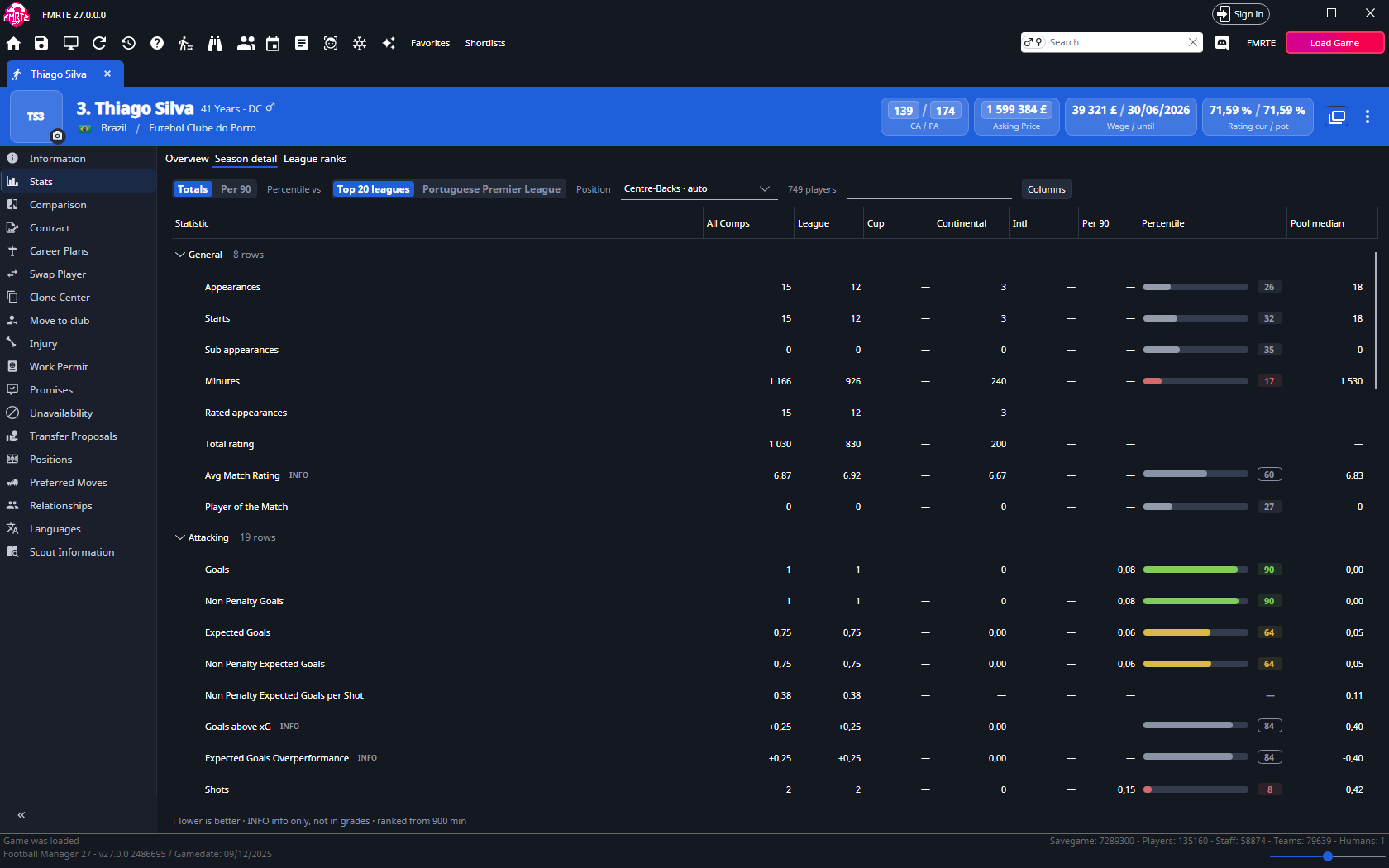
The comparison league and position choices are shared with Overview. The Percentile and Pool median columns describe the player's All comps value, using its rate per 90 where supported, even when Totals is selected. They do not provide separate percentiles for each scope column.
The dedicated Per 90 column always shows the All comps rate. In Per 90 mode, All comps shows that same rate too. Percentage and rating statistics retain their own units. For a paired row, the percentile and median describe its first statistic.
Find a player's league rank
- Select League ranks, or All league rankings in Overview.
- Choose the competition. The club's continental competition is also offered when the player has a record in it.
- Select a position group and minimum minutes: no minimum, 450 or 900.
- Choose Totals or Per 90, then select a statistic in the left-hand picker.
- Find the highlighted player row and read the summary. Double-click another row to open that player.
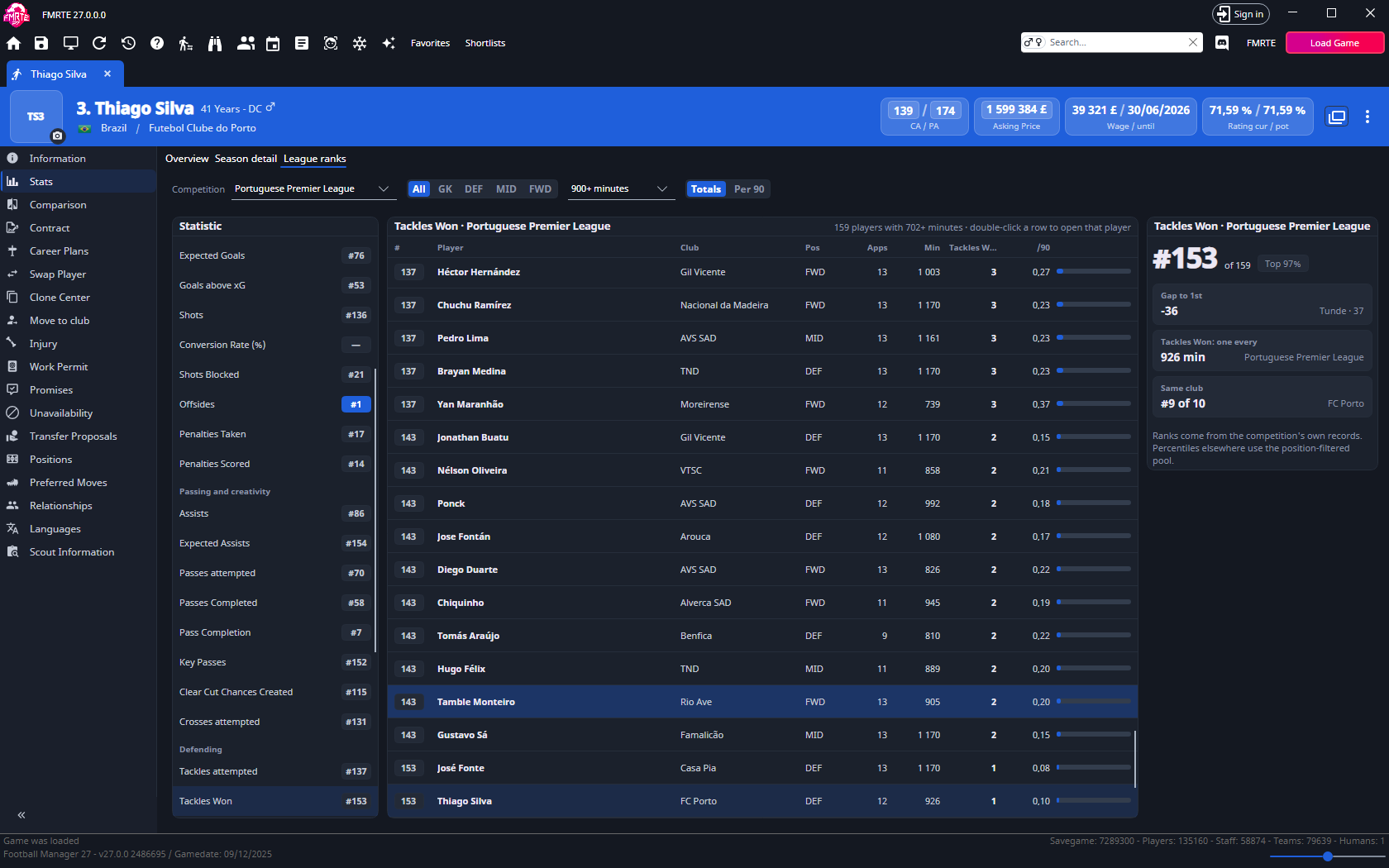
The board shows the rank, gap or lead to first, club rank and other context available for that statistic. Lower-is-better statistics rank lower values first. Percentage gaps use percentage points. Equal values share a rank.
The competition, position and minutes filters here are separate from Overview's comparison filters and six league-ranking rows. Totals / Per 90 is shared with Season detail and changes the board's ranking. Both total and rate columns remain visible.
League ranks uses the competition's own player records. Season detail uses the player's season records. Those independent records can differ, and FMRTE does not reconcile them. Football Manager creates a competition record on the player's first appearance.
Understand missing values and small samples
| What you see | How to read it |
|---|---|
| — for a rate | Per-90 figures are hidden below 90 minutes in that scope. Check Totals or hover the cell for the minutes played. |
| A ratio without a percentile | There are too few attempts for comparison. The value can still appear. Typical thresholds are 10 shots, 10 tackles or 10 headers, 20 pressures, 100 passes and 10 shots faced for a goalkeeper. |
| An indicative percentile | Fewer than 30 eligible players are in the comparison population. |
| A small-sample message or fainter profile | The player's selected-scope minutes are below the comparison population's minutes floor. |
| Basic tiles but no detailed profile | The record lacks full match detail. Missing detailed data is not a poor performance or a zero. |
| No rank | The player has no eligible competition record under the filters, or the competition has no values for that statistic. Goalkeeper-only statistics do not rank outfield players, and outfield-only statistics do not rank goalkeepers. |
Comparison players normally need 900 minutes. Early in a season, the floor is 60% of the most-used player's league minutes, capped at 900. League ranks similarly limits the requested minutes to the competition's current floor. Check its caption for the actual threshold. The selected player can still be compared below the comparison floor, with a small-sample message.
Overview compares the selected scope's performance with peers' overall-club records. Choosing the player's own league selects league membership. It does not turn those peer values into competition-owned league records. Players without minutes or full match detail are excluded from these comparisons.
Refresh the figures or use them in lists
Stats shows the last loaded snapshot. Use Reload Screen while Stats is active to read it again. Comparison populations rebuild when the in-game day changes or the save reloads. Wait for loading to finish before comparing values.
Player lists also offer read-only overall-club season, advanced and career statistics through Add/Remove columns. These display fields are not available as editable Mass Edit, preset, Freezer or import targets.