Supported onWindowsmacOSLinux (Steam Deck)
Open in
Contracts, wages and clauses
warning
A contract edit does not run a negotiation, register the player, grant a work permit or exchange a transfer fee. Check those separately when needed.
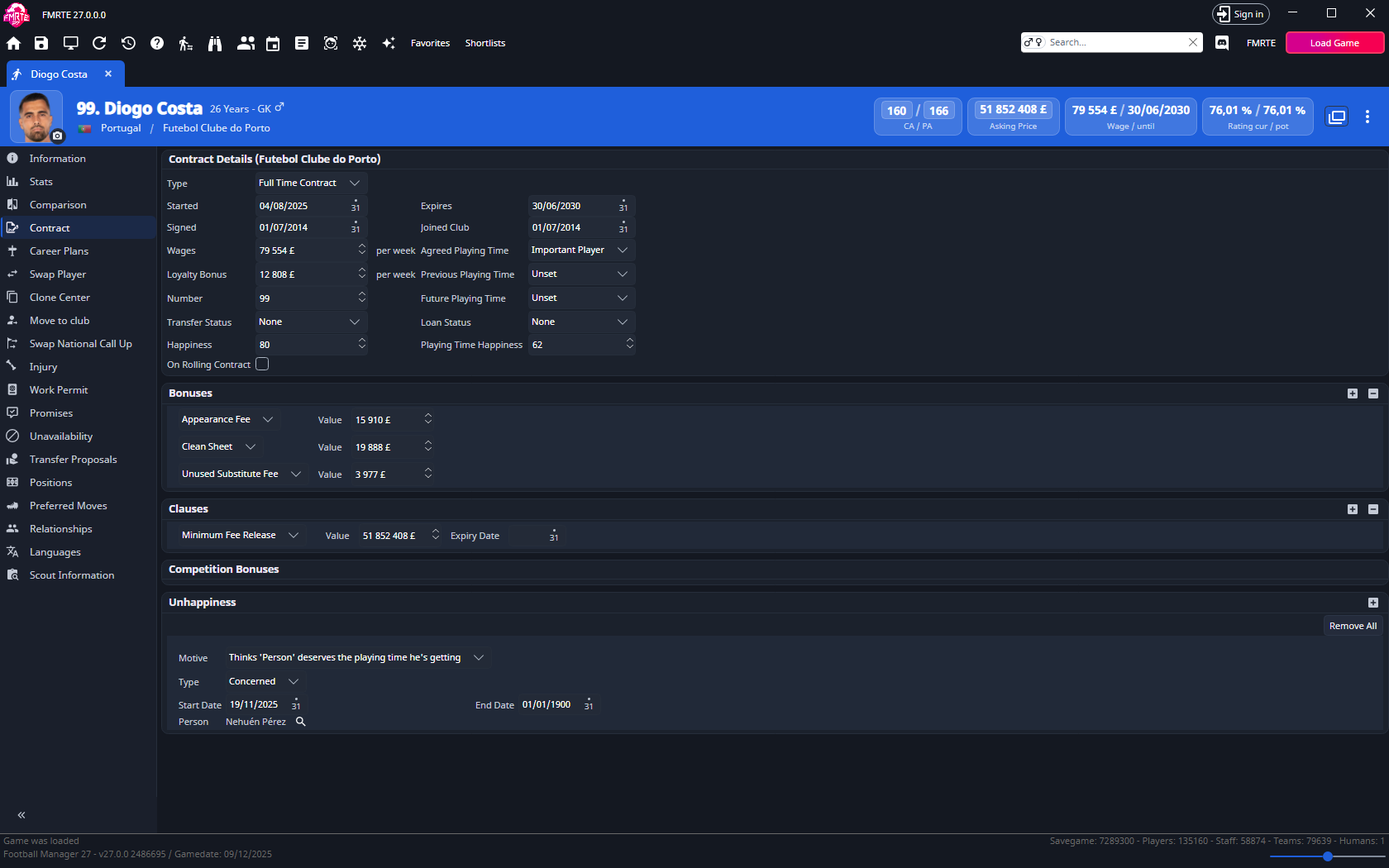
Use Contract to change an existing deal's expiry, wages, playing time, bonuses or clauses.
Understand the displayed units
- Check Currency and Wages in Settings → General → Appearance before entering money. Weekly, monthly and annual amounts differ.
- Started, Signed, Joined Club and Expires describe different dates.
- Agreed Playing Time, transfer status and loan status use the choices shown in the list.
Extend an existing contract
- Open the player and select Contract.
- Choose the current-club contract if several are listed.
- Set Expires to the new date. Leave the other dates as they are unless you also intend to change them.
- Adjust wages or clauses if wanted, then select Save Changes.
- Check the contract in Football Manager.
Release clauses for many players
To set or remove a release clause for many players at once, use a preset with a Release clause action, or the Release clause fields on the Contract tab of Mass Edit.
Loan contracts
After a loan move, reload the player and open Loan Contract to set dates, fees, playing time and loan clauses.