Open in
Comparing two players
Comparison puts the player you opened next to another player. It shows their attributes and positions side by side. Comparison is read-only: nothing you do here changes either player.
Choose who to compare
- Open the player and select Comparison.
- Select Compare with.
- Type the other player's name and pick them from the results.
The player you opened is on the left and the other player on the right. Each card shows the player's name, date of birth and age, nationality and club. A player with a contract also shows Valued at, their wage, contract end date and playing time. A player without a club shows Free Player.
To compare with someone else, select Change beside the second player's name. Select the second player's name to open them. Select a nationality or club to open that nation or club.
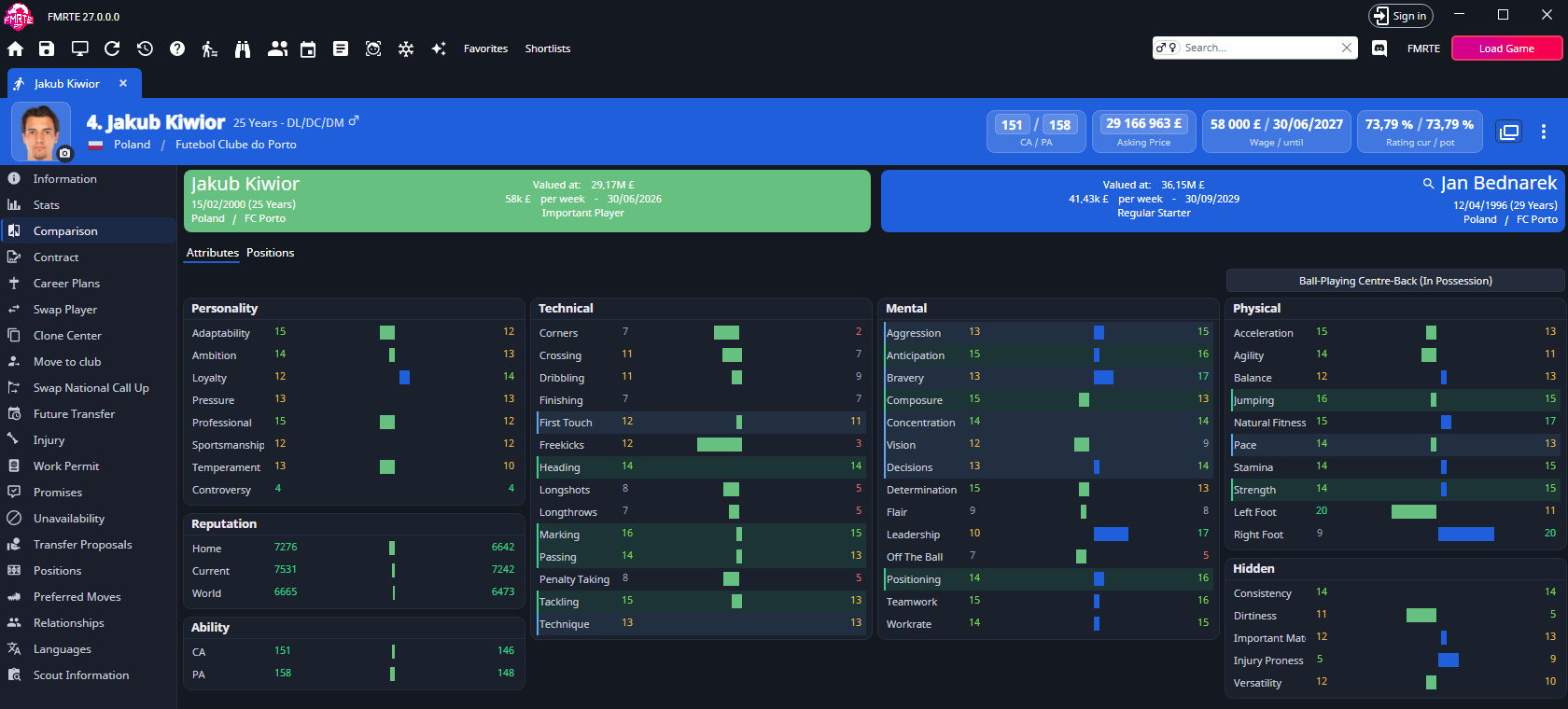
Attributes
Attributes lists each value for both players, with a bar between them showing the difference. The groups are:
- Personality
- Reputation: Home, Current and World
- Ability: CA and PA
- Technical, or Goal Keeper when the player you opened is a goalkeeper (Goalkeeper familiarity above 15)
- Mental
- Physical
- Hidden
To see which attributes matter for a role, select Highlight attributes at the top right and choose a role and duty. The key, preferable and to-avoid attributes are highlighted for both players. The roles offered are the ones for the player you opened. Choosing a role changes the highlights only.
To edit an attribute, open the player's Information page.
Positions
Positions shows the two players' positional familiarity on two pitches, the player you opened on the left. The pitches can't be edited here. To change a position, use the player's Positions page.