Open in
Editing players
New to FMRTE? Start with Your first edit.
Open a player to see their pages on the left. Use this overview to find the right tab
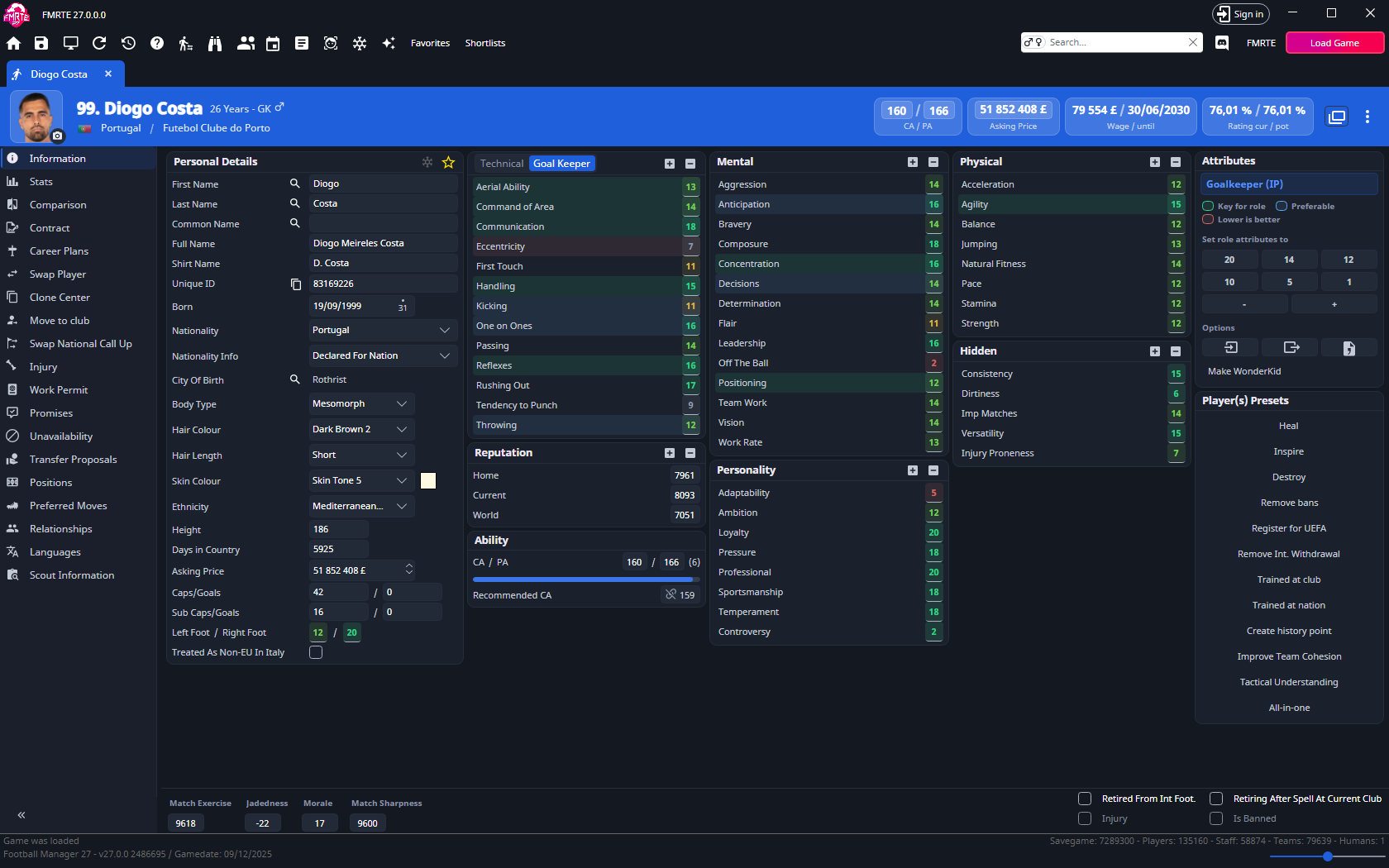
The compact header lets you edit CA/PA and Asking Price without leaving the current section. Contract wage/expiry and current/potential rating are shown as summaries. Edit the contract in Contract. Player ratings explains the ratings. Header images can show a portrait.
Player tabs at a glance
Some tabs appear only when the player has the relevant contract, transfer, national-team or retirement record. Staff appears only for a player-coach.
| Tab | What you'll find |
|---|---|
| Information | Attributes, ability, personal details, fitness and morale. |
| Staff | For a player-coach only: the staff half's Information, Training Rating, Formations/Tendencies and Knowledge. |
| Stats | Read season statistics, performance comparisons and competition leaderboards. |
| Comparison | Compare two players' attributes and positional familiarity. |
| Contract | Contract dates, wages, clauses, playing time and happiness. |
| Career Plans | Career preferences, such as a future club or job, the conditions attached to them, and the job the player wants after retiring. |
| Swap Player | Exchange two players between their clubs. |
| Clone Center | Copy this player's personal details, ability, reputation, attributes, positions and preferred moves onto other players. Choose the fields under What to copy. |
| Move to club | Move the player to another club, permanently or on loan. |
| Swap National Call Up | Replace a player in a national squad. |
| Future Transfer | The player's already agreed transfer. |
| Injury | Injury type and recovery dates. |
| Work Permit | The player's work permits and work permit refusals. |
| Promises | Promises a manager made to the player, with their type and dates. |
| Unavailability | Bans and other reasons the player cannot play. |
| Transfer Proposals | Existing transfer offers involving the player. |
| Retire Date | A scheduled retirement date. |
| Positions | Familiarity with each position on the pitch. |
| Preferred Moves | Traits that influence how the player behaves in matches. |
| Relationships | Links to people, clubs and nations, including second nationalities. |
| Languages | Spoken languages and proficiency. |
| Scout Information | General Rating, Positional Rating and Role Ratings. Role Ratings shows the rating in each role at the position you pick, now and at the player's potential. |
Add or remove player favourites
- Open the player's Information page.
- Select the star to add the player to your favourites.
Open Favorites to return to the player later. To remove them, select the star again on their Information page.
Favourites are tied to the savegame.
Right-click a player row
Right-click a player in a list, or use the ⋮ button in the player's header, to act without opening each player. Select several rows first to act on all of them. Right-click actions shows which lists have this menu.
Actions with Yes under Licence need an active licence. Without one, FMRTE opens the activation dialog first. None of these actions asks for confirmation. Release and move actions are recorded in Edit History, but they cannot be undone there.
| Action | What it does | Licence |
|---|---|---|
| Add to favourites | Adds the players to your favourites. | |
| Copy Name to Clipboard | Copies the names, separated by commas. | |
| Copy Id to Clipboard | Copies the unique IDs, separated by commas. | |
| Shortlists | Add to new shortlist saves a new .fmf file, Add to Shortlist File adds to a file you pick, and Add to lists your recent shortlist files. See Shortlists. | |
| Presets... | Applies an active player preset, grouped by category. Shown when you have one. | Yes |
| Freeze / Unfreeze | Adds the players to, or removes them from, the Freezer. | Yes |
| Release on a free | Ends the players' contracts and makes them free agents. Only on the Squads tab and the player header. See Release a player. | Yes |
| Move to club / Move to club On loan | Moves the players into the first team of a club managed by a human manager, permanently or on loan. With several human-managed clubs, pick the club under Move to club or Move to club On loan. Shown when a human manager has a club. | Yes |
| Custom → Export NewGAN RTF | Experimental. See Export a NewGAN RTF list. | Yes |
Move to works like Move to club with the club already chosen. A loan needs a player who already has a full contract, otherwise nothing changes. Moving a player who is already in that club's first team does nothing. A player in the club's reserve or youth team moves into its first team.
Tools on a player profile
Use Presets for ready-made changes, Freezer to maintain selected values, Import/Export to copy player data, or Make WonderKid to generate attributes for a role.