Open in
Personal details
Open a player's Information tab to change their name, nationality, birth details and other fields in Personal Details.
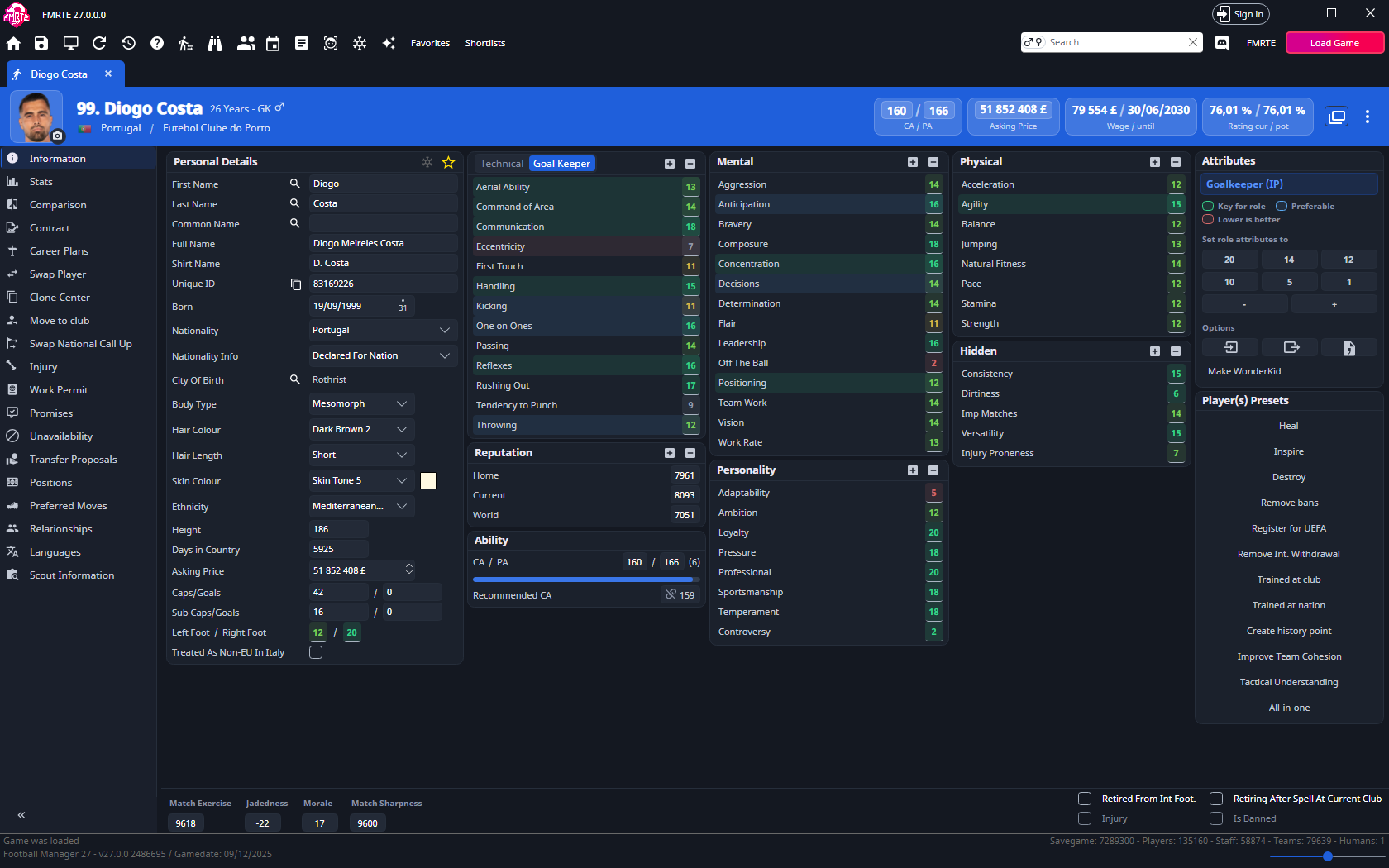
What you can change
| Field | What it contains |
|---|---|
| First Name, Last Name, Common Name | The parts of the player's name. See Change a player's name for the two ways to edit them. |
| Full Name | The person’s full name, separate from the existing name parts. |
| Shirt Name | The player’s shirt name. |
| Unique Id | The player's database ID. Read-only. Use the button beside it to copy it. |
| Born | The player's date of birth. |
| Nationality | The player's primary nationality. Add another nationality through Relationships. |
| Nationality Info | The recorded nationality or eligibility status, such as Born in nation or Eligible for nation. |
| City Of Birth | The player's birthplace. Use the search button beside the field to choose a city, or select the name to open the city. |
| Body Type | The player's body type. |
| Hair Colour, Hair Length, Skin Colour | The player's appearance settings. |
| Height | The player's height. |
| Days in Country | The player's recorded time in their current country. |
| Asking Price | The asking price, shown in the currency selected in FMRTE. |
| Caps/Goals | Senior international appearances and goals. |
| Sub Caps/Goals | Under-21 international appearances and goals. |
| Left Foot, Right Foot | Ability with each foot, using the 1–20 scale. |
| Treated as non-EU in Italy | The player's non-European Union (non-EU) status for Italy. See Registration and permits. |
Full Name and Shirt Name have their own length limits. Use the limit shown by the field. Changing a name field does not establish that every game screen refreshes immediately.
Edit a personal detail
- Find the player and open Information.
- Change the field in Personal Details.
- Select Save Changes.
- Check the updated detail in Football Manager.
Use the search button for City Of Birth, the date picker for Born, and the lists for nationality and appearance options.
Change a player's name
You can select a name already in the database or type into First Name, Last Name or Common Name.
Select a name already in the database
- Open the player's Information tab.
- Select the search button beside First Name, Last Name or Common Name.
- Search for the name you want.
- Select the replacement from the results.
- Select Save Changes.
Reopen the player's profile in Football Manager to check the name. The game's display may need time to refresh.
Type a name into the field
Direct editing can be limited by the original name's length. Name text can also be shared by several people.
- Open the player's Information tab.
- Enter the name in First Name, Last Name or Common Name.
- Select Save Changes.
- If a prompt says other people share the name, Yes renames all of them and No cancels the change. To rename only this player, choose a name already in the database instead.
Shorter names may retain spaces. Repeated saving or adding spaces does not remove the length restriction. You can instead select a name already in the database.
Change the primary nationality
- Open Information.
- Choose the nation in Nationality.
- Review Nationality Info and select the status you intend to set.
- Select Save Changes.
To keep the current nationality and add another, use Other Nationality in Relationships.
Nationality does not automatically grant home-grown status, a work permit or registration. See Registration and permits.