Open in
Nation transfer rules
Open a nation's Transfer Rules tab to change its work permit rules, its transfer window dates and who can join a club outside a window.
Choose Men's Football or Women's Football, where shown. Each set has its own rules.
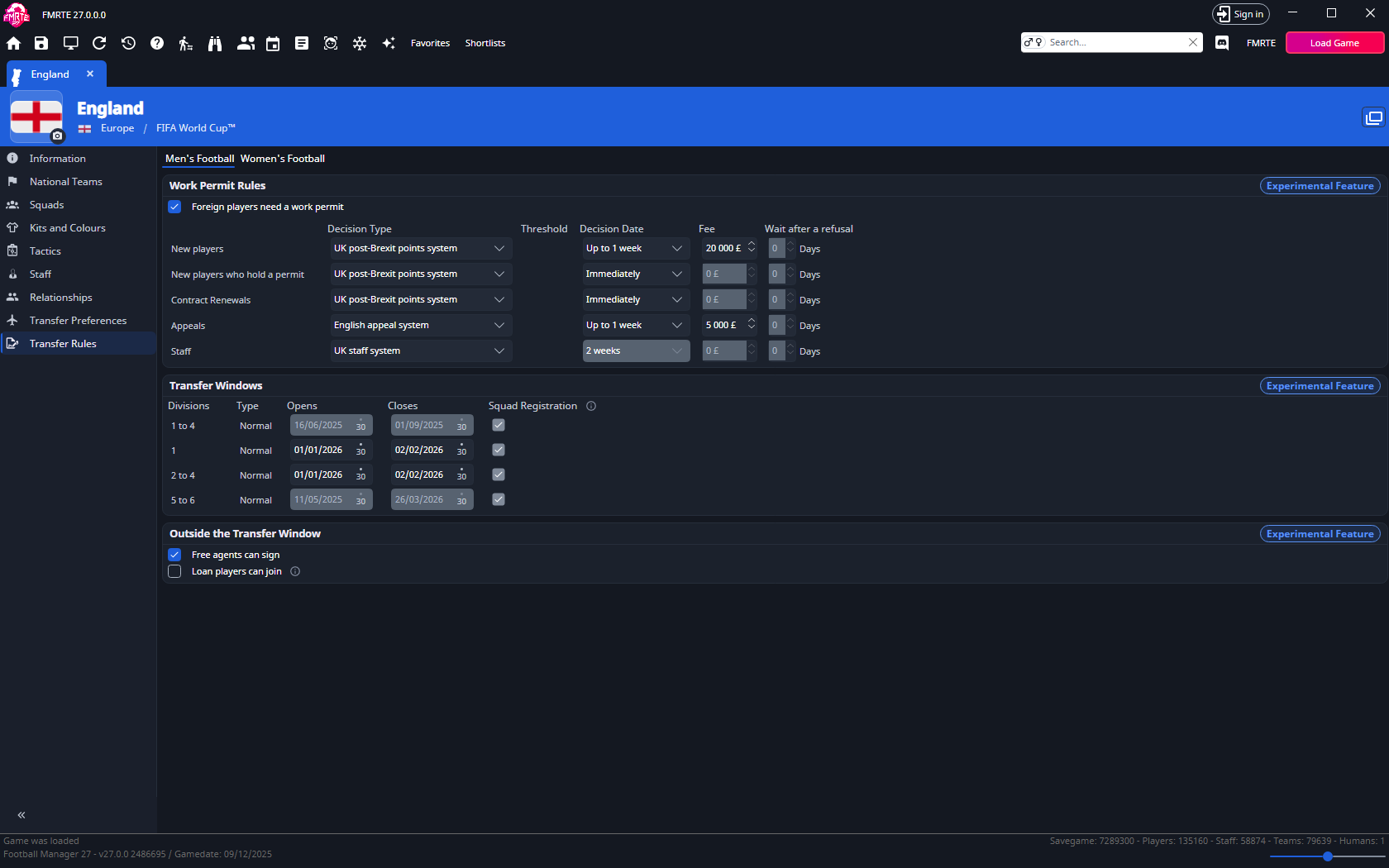
Show the Transfer Rules tab
Transfer Rules is an experimental feature, so the tab is hidden until you turn on experimental features. Then open the nation again and select Transfer Rules.
Each card on the tab carries an Experimental Feature label.
No transfer rules to display
Football Manager builds a nation's transfer rules from the competitions running in your savegame. A nation with no competition running has none, so the tab shows No transfer rules to display. The women's rules need a women's competition running in the nation.
Work Permit Rules
Foreign players need a work permit turns work permits on or off for the nation. When it is ticked, the card lists one row for each section the nation has:
| Section | Who it applies to |
|---|---|
| New players | Foreign players joining without a work permit. |
| New players who hold a permit | Foreign players joining who already hold a permit. |
| Contract renewals | Foreign players renewing a contract. |
| Appeals | Appeals against a refused permit. |
| Staff | Foreign staff. |
Each row has these fields:
| Field | What it controls |
|---|---|
| Decision Type | The system that decides an application, such as UK post-Brexit points system, % of international games in the last 16, Weekly wage or Swiss system. Appeals and staff offer their own systems. |
| Threshold | The value the decision system compares with, in that system's unit: % of games, a weekly wage (a week) or ability (1-200). |
| Decision Date | How long the decision takes, from Immediately to 1 month. |
| Fee | The cost of an application. |
| Wait after a refusal | How many days (0 to 127) a refused player waits before the same club can apply again. |
Change the values you need, then select Save Changes.
Decision systems and thresholds
Picking another decision system fills in a threshold for it, so the system and its threshold are saved together. Check the threshold before saving.
Some systems don't use a threshold, so the row shows none: the UK points systems, UK staff system, English appeal system, Norwegian ability system and UK wage system. Swiss system and Scottish appeal system show a threshold without a unit.
Greyed-out fields
A greyed-out field isn't in the rules saved with the game, so it can't be changed. Its tip says Not saved with the game, so it can't be changed.
While Threshold is greyed out, Decision Type doesn't offer systems that measure the threshold in another unit.
A rule that wasn't changed
If Football Manager refuses a value, the row keeps your choice with a red border and a warning toast, Work permit rule not changed, says why. Hover over the field for the reason. A value is refused when the game changed the rules since the page was opened, or when it is outside what the game allows. Change the value, or reopen the nation and try again.
Turn work permits off
Clear Foreign players need a work permit and select Save Changes. The sections are removed and the card shows You can turn this back on until you reload this page or the game. After that, the nation shows No work permits are needed.
Changing the wait after a refusal
A new Wait after a refusal applies to refusals made after the change. A player who was already refused keeps the wait they were given. To clear it, open the player's Work Permit tab and select Remove beside the club under Work Permit Denied.
Transfer Windows
Each row is one of the nation's transfer windows:
| Column | What it shows |
|---|---|
| Divisions | The division levels the window covers, such as 1, 2 to 4 or 5 and below. |
| Type | What the window allows, such as Normal, Loans only or Free transfers only. |
| Opens and Closes | The window's dates. |
| Squad Registration | Ticked when the window also opens squad registration in leagues that follow the transfer windows. You can't change it here. |
To move a window:
- Pick new dates in Opens and Closes. The opening date stays in its own year, and the window must close within a year of opening.
- Select Save Changes.
- Follow the reload steps in the dialog that opens.
The new dates apply to transfers straight away. For Football Manager to announce the window, report when it closes and run deadline day, save the game and load it again.
Windows you can't change
Some windows show their dates on read-only pickers. When the game sets a window's dates itself, the tip says so. A window whose dates follow a fixture shows Set by the fixture list instead of dates.
If FMRTE reports that a date doesn't exist in the game's season, pick another day. 29 February is one such date.
Outside the Transfer Window
| Setting | What it allows |
|---|---|
| Free agents can sign | Clubs can sign free agents while the transfer window is closed. |
| Loan players can join | Loan players can join while the transfer window is closed. |
A setting with an info icon isn't in the rules saved with the game. A change to it Lasts until you reload the game.
Finish the changes
Saving a moved transfer window opens the Finish the transfer window change dialog. Moving a squad registration period opens the same steps. When the dialog holds both kinds of change, it is called Finish the changes.
- Save your game in Football Manager, in any slot. The step is ticked when FMRTE sees the save.
- Load that save in Football Manager.
- Load the game in FMRTE. Select Load Game in the dialog.
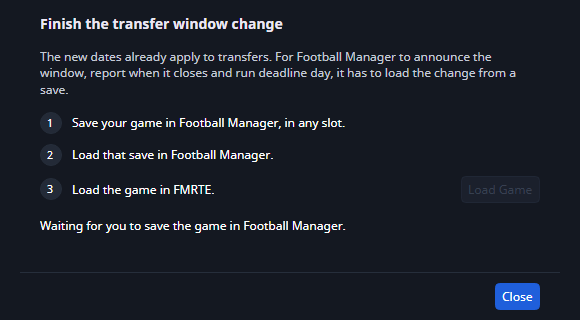
FMRTE then checks the reloaded game. For a transfer window, it confirms that the save has the new dates and that the game has scheduled the window's news and deadline day. If the save doesn't have the new dates, change the window again, then save and load once more.
Dates you move while the dialog is open join the same check, so one save and load covers all of them. If the game moves on to a later date before you reload, the dialog asks you to save and load the game before playing on.
Undo a change
Saved changes appear in Edit History. A moved transfer window is one row with both dates. Undoing it puts the old dates back, and an open reload dialog then checks those dates instead.
A decision system changed to one that measures its threshold in another unit can't be undone, and neither can the threshold saved with it.