Open in
Competition rules
Open a competition's Rules tab to edit its squad registration limits.
With experimental features on, the tab also shows the competition's squad registration periods and any work permit rules of its own.
| Card | What it holds | Experimental |
|---|---|---|
| Squad Registration | Squad size, homegrown and goalkeeper limits. | No |
| Squad Registration Periods | When registration opens and closes. | Yes |
| Work Permit Rules | Work permit rules the competition keeps for itself. | Yes |
To show the experimental cards, turn on experimental features, then open the competition again. These cards carry an Experimental Feature label.
A competition with none of these shows No rules to display: This competition has no squad limits, registration periods or work permit rules of its own.
Squad Registration
For a competition with squad registration rules, such as a league or the UEFA Champions League, Squad Registration shows the ones it has:
| Field | What it limits |
|---|---|
| Maximum squad size | The most players each club can register. 25 in the English Premier League. |
| Minimum squad size | The fewest players each club must register. |
| Homegrown in Nation | How many registered players must have been trained in the country. |
| Homegrown at Club | How many registered players must have been trained at the club. |
| Goalkeepers in the squad | How many goalkeepers each club can or must register. |
| First-Year Senior Players In Squad | How many players in their first senior year each club must register. |
Each value shows Min. or Max., as the game marks the rule: a minimum the squad must reach, or a maximum it must not pass.

Change a value, then select Save Changes. For example, raise Maximum squad size to let clubs register more players.
Some competitions share one set of rules, so a change applies to all of them. When they do, Also Applies To lists the others. Select one to open it. For example, the UEFA Champions League shares its rules with the Europa League and the Conference League.
Some limits only apply to some clubs. Each of these gets its own row, named after the clubs it covers in the Football Manager Editor's words. For example, the Portuguese Premier League shows Maximum squad size - Portuguese Club with B Teams and Maximum squad size - Portuguese Club with no B or U23 Team. A limit set for one club names that club, such as Maximum squad size - For Team: Urawa in the J1 League. The game's own registration screen shows only the limits that apply to your club, while FMRTE shows all of them.
Changes are kept when you save the game in Football Manager and load it again. The game's registration screen catches up a day later: if you save straight after changing a limit, without opening that screen first, it shows the old figures after you load the save until a day passes in the game. The limits themselves are already the new ones.
Changes that last until a reload
Some competitions show Changes here last only until you reload the game. Hover over the info icon for the reason:
- The game builds these rules itself. For a few competitions, such as the UEFA Champions League, Europa League and Conference League, Football Manager creates the rules every time it loads a save, so your change isn't kept in the save.
- The rules saved with the game hold other values. The rules saved with the game differ from the ones the game is using, for example after another tool changed them. Loading the save brings those values back.
Squad Registration Periods
Each row is a period when clubs can register players:
| Column | What it shows |
|---|---|
| Opens and Closes | The period's dates. The pickers offer the season's two years. |
| Maximum squad size | The squad limit for the period. You can't change it here. |
A row marked First registration of the season shows read-only dates.
To move a period:
- Pick new dates in Opens and Closes.
- Select Save Changes.
- Follow the steps in the Finish the squad registration change dialog that opens.
The game opens and closes registration on these exact days. A changed date is saved with the game, and it applies once you save the game in Football Manager and load it again. The dialog's steps are the same as for a transfer window: see Finish the changes. After the reload, FMRTE checks that the loaded save has the new dates.
Periods you can't change
When a league's periods follow the nation's transfer windows, the card says These periods follow the nation's transfer windows, so they can't be changed here. To move them, move the windows on the nation's Transfer Rules tab.

29 February, or any other day that isn't in every season, can't be saved. FMRTE leaves that period unchanged and says why.
Work Permit Rules
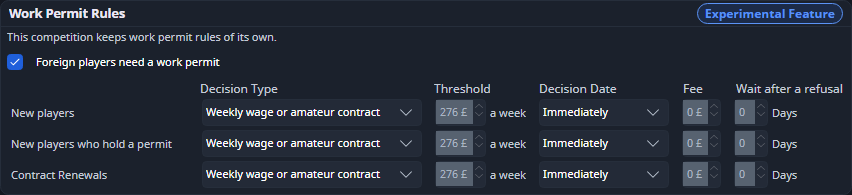
Some competitions keep work permit rules of their own, separate from their nation's. The card says This competition keeps work permit rules of its own. Such a competition has the Rules tab even without squad registration limits.
The fields work as on the nation's tab: see Work Permit Rules.
Undo a change
Saved changes appear in Edit History. Each moved date of a squad registration period has its own row. Undoing one puts the old date back, and an open reload dialog then checks that date instead.