Open in
Club wage contributions
When a player is transferred, the old club can still pay part of the salary. A club's Wage Contributions tab lists the contributions the club pays or receives. The tab appears only when the club has at least one.
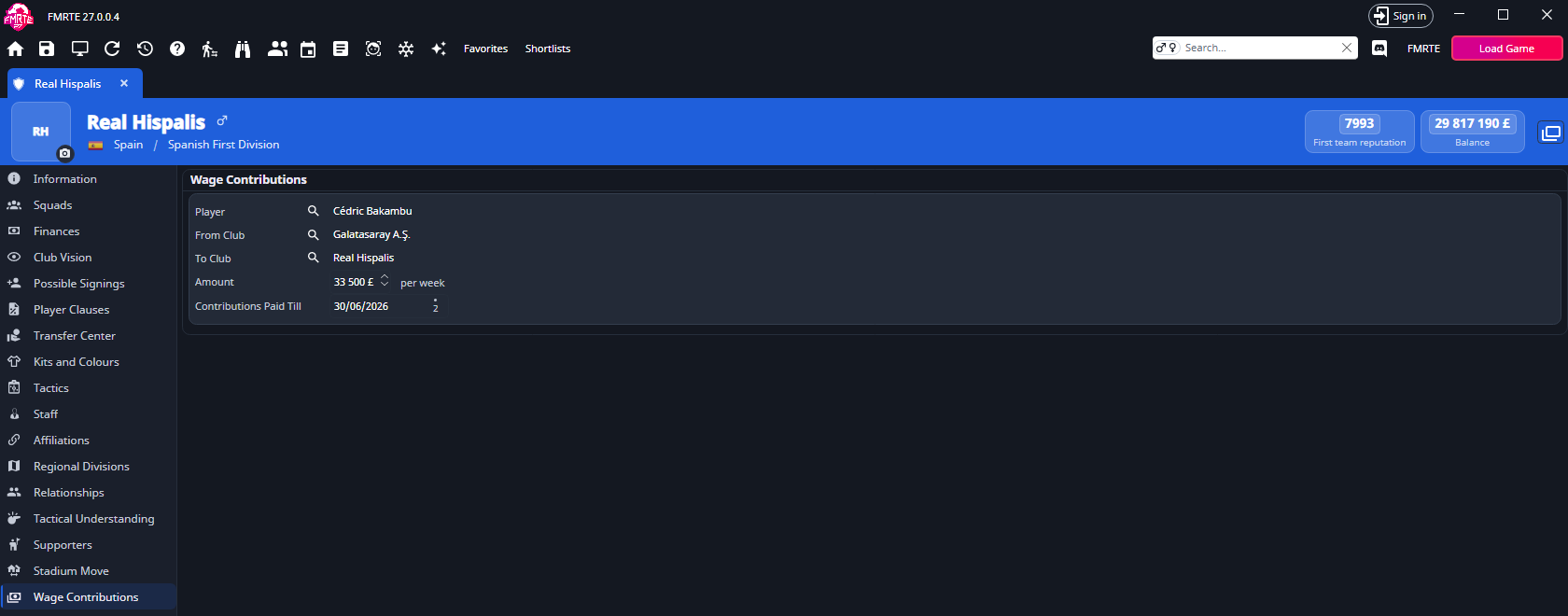
What each contribution shows
Each contribution has its own box. The labels are the same as in Football Manager.

| Field | What you can do |
|---|---|
| Player | The player the contribution is paid for. Select the name to open the player, or use the search button to choose another one. |
| From Club | The club that pays. Select the name to open the club, or use the search button to choose another one. |
| To Club | The club that receives. Select the name to open the club, or use the search button to choose another one. |
| Amount | The wage paid, 0 or more. It uses your currency and wage settings, so it can show per week, per month or per year. |
| Contributions Paid Till | The date the contribution ends. |
In the example above, Galatasaray pays Real Hispalis 33,500 a week towards Cédric Bakambu's wages until 30 June 2026.
Change a contribution
- Open the club and select Wage Contributions.
- Change Amount or Contributions Paid Till, or use a search button to choose another player or club.
- Select Save Changes.
Back up your save first, and check the club's finances in Football Manager after you select Continue.
You cannot add or remove a contribution here.
Undoing a change
Your changes appear in Edit History, but they cannot be undone from there. The game removes a contribution when it ends, so an undo could write to the wrong place. Load an earlier save to go back. See Backups and recovery.
If the game ends a contribution while the tab is open, Save Changes skips it.