Open in
Club tactics
The club's Tactics tab compares the team's tactic with the eleven FMRTE would pick for it and for other formations. You can also edit a formation's positions and save it as one of FMRTE's formations.
Nothing on this tab is written to the game. Saving a formation only changes FMRTE's own formation files.
The same tab appears on a nation's Tactics page for its national team.
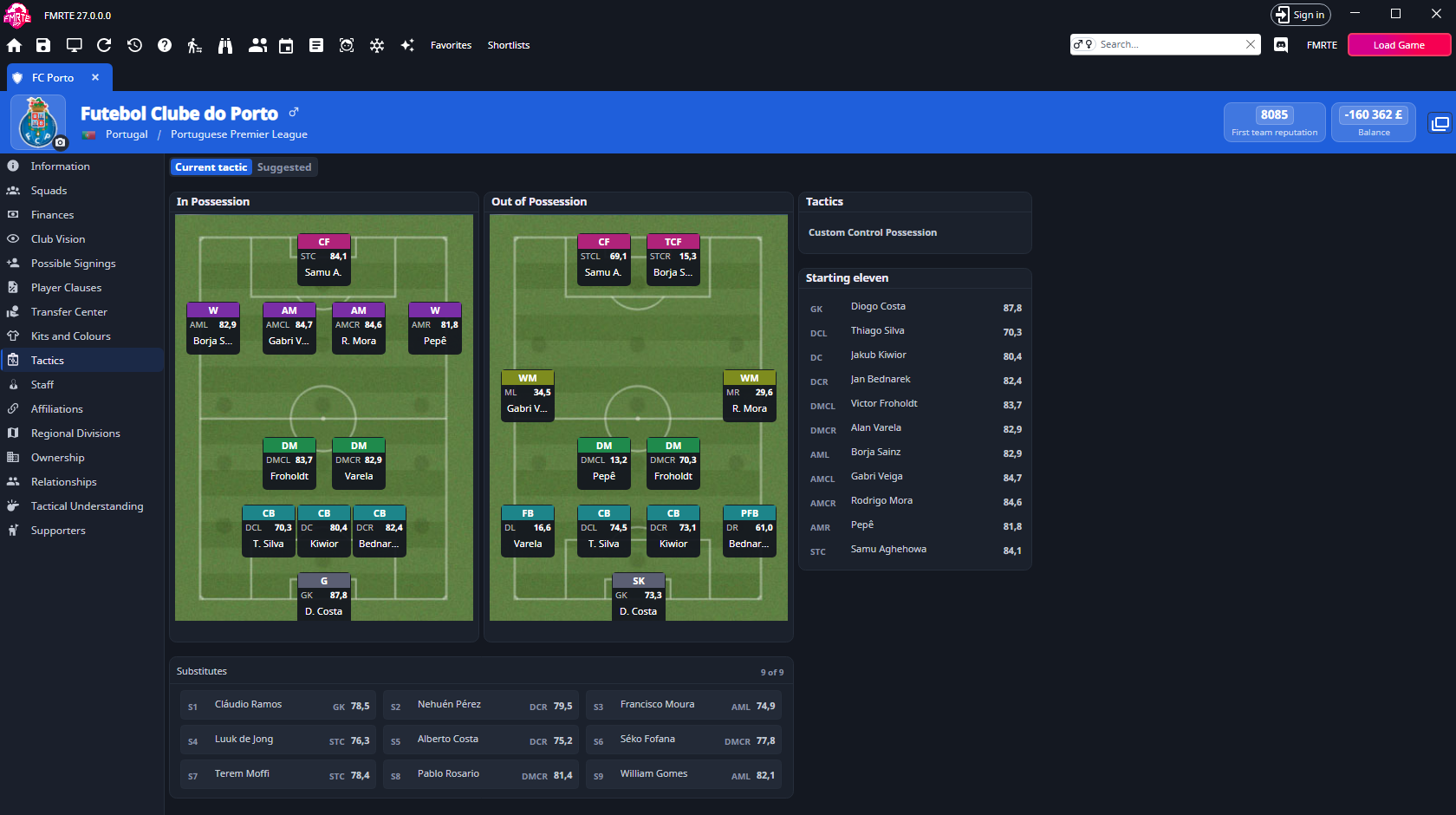
Choose what to show
The switch at the top chooses between the team's own tactic and FMRTE's suggestion:
| Setting | What you see |
|---|---|
| Current tactic | For a team a human manages now: the tactic set in the game, with both formations, the roles and the current picks. Empty places stay empty. |
| Last match | For any other team: the tactic it used in its last match. |
| Suggested | The eleven FMRTE would pick for the formation selected in Formation. |
The switch shows Current tactic or Last match, never both. When FMRTE cannot read the team's own tactic, the switch is hidden and the tab shows Suggested only.
A human manager's team never shows Last match, because that tactic does not hold the shape the manager plays.
What the tab shows
Both views use the same layout:
- In Possession and Out of Possession pitches, with a card for each player. The number on a card is the player's score for that place, from 0 to 100. Hover a card's heading to see the role. Select a player's name to open their profile.
- Substitutes under the pitches, with each player's best place and score. The header shows how many bench places are filled, such as "8 of 9".
- Starting eleven on the right, from the goalkeeper up.
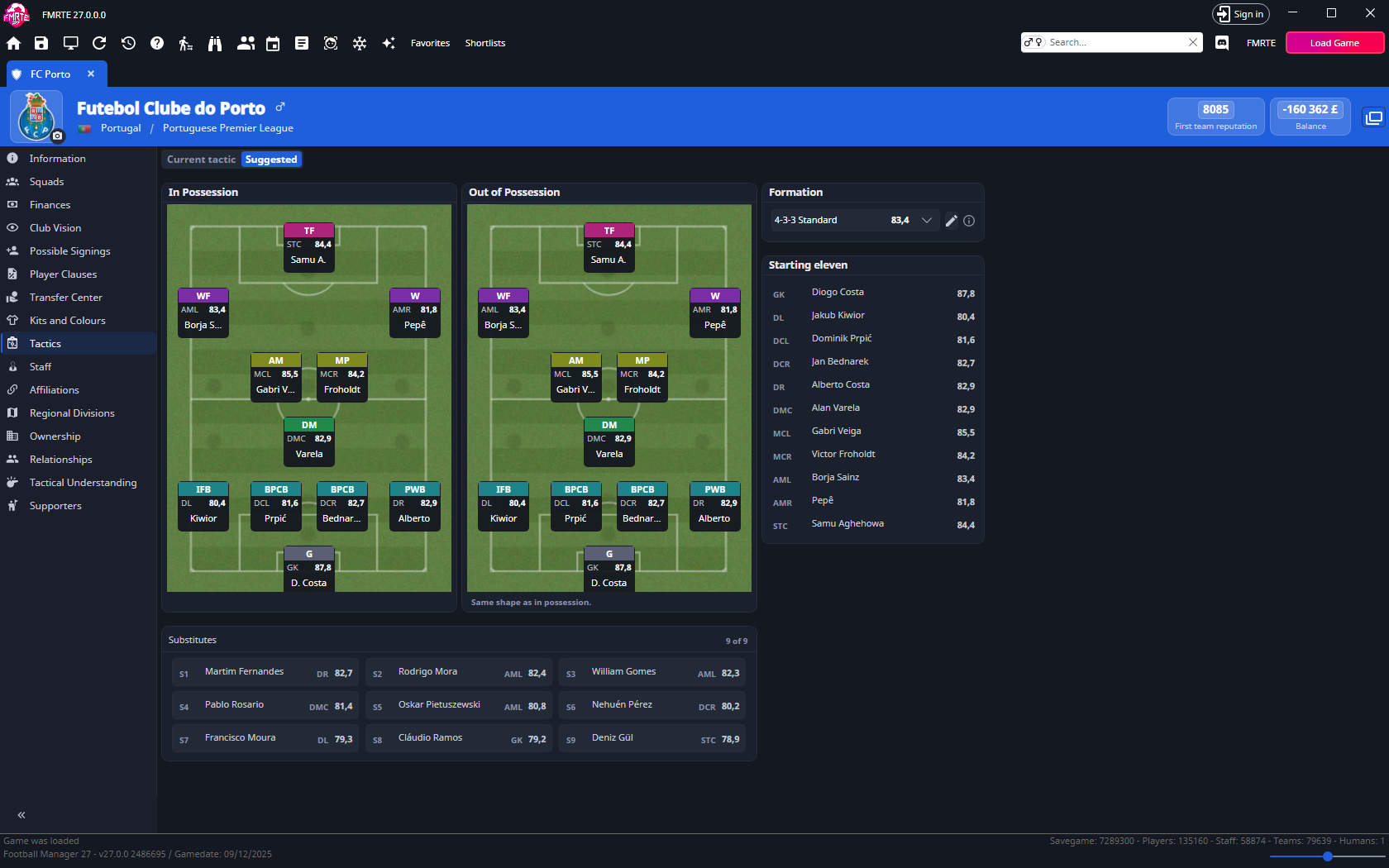
In Suggested, an outline marks a player whom the team's own tactic doesn't start. The note under the pitch says so: "Outlined: not in the current eleven." or "Outlined: not in the eleven of the last match."
Out of Possession pitch
A formation without an out-of-possession shape of its own shows its in-possession shape on this pitch, with the note "Same shape as in possession.".
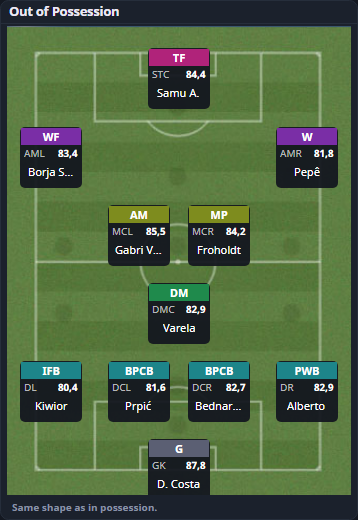
For a tactic from the game that names its out-of-possession roles, the numbers on this pitch are the players' ratings for those roles. Everywhere else they are selection scores. Hover over the pitch to see which.
Compare formations
- Select Suggested.
- Open the Formation list. The team's own tactic comes first, then every other formation, strongest first.
- Choose a formation to see the eleven and substitutes FMRTE would pick for it.
The number beside each formation is the average selection score of that eleven, from 0 to 100. A player's score depends on position, role, ability, potential, fitness, reputation and morale. The information icon beside the list says the same.
Tactics from the game are marked In game (the team's own) or Saved in game (a human manager's other saved tactics). The other entries are FMRTE's formations, including the ones you have saved. A formation you saved under the same name as one of FMRTE's replaces it in this list.
Edit a formation's positions
Move the players of a formation to other places and save the shape as one of FMRTE's formations.
- Select Suggested and choose a formation in Formation.
- Select the pencil button (Edit positions) beside the list.
- Drag a player's card to another place on the same pitch.
- Check the name and rating in the header, then select Save.
The tab reloads with the saved formation selected in Formation.
What you edit depends on the formation you start from:
| Formation | What you edit |
|---|---|
| One of FMRTE's formations | That formation, under its own name. |
| A tactic from the game (In game or Saved in game) | A copy with "(copy)" after the tactic's name, such as "Gegenpress (copy)". If one of your formations already has that name, the copy is "Gegenpress (copy 2)" and so on. Only the positions are kept, not the roles. |
The pencil button is unavailable while a tactic from the game has an in possession place FMRTE can't read.
Move players
While you edit, both pitches show every place a player can stand: the sweeper's place, then five places on each line from defence to attack. The goalkeeper stays in goal.
- Drag a card. It follows the pointer while the original stays faint in its place.
- Drop it on an empty place to move the player there, or on another card to swap the two players.
- A card moves only on the pitch it came from. If you let go over the other pitch, or anywhere else, it goes back.
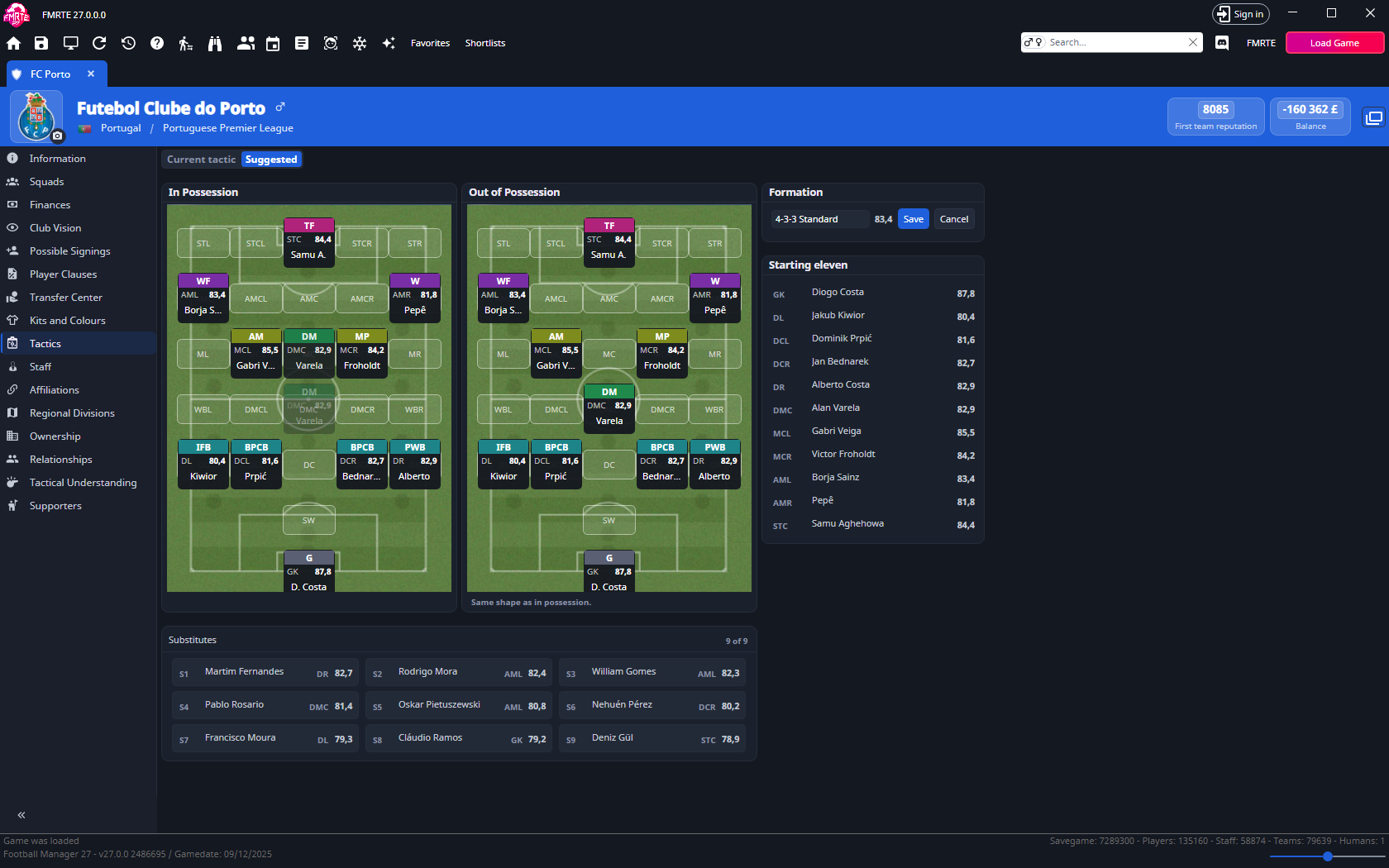
After each move, FMRTE picks the eleven, the scores and the substitutes again for the new shape.
In and out of possession
While the formation has no out-of-possession shape of its own, moving a player on In Possession moves him out of possession too.
Your first move on the Out of Possession pitch gives the formation its own out-of-possession shape. It is saved with the formation.
Shapes you can save
Any shape with one goalkeeper and one player in each place can be saved, including shapes without a right-back, with two players on the left or with four strikers.
If two players stand in one place, the note under the pitch says "Two players stand in one place. Move one of them to save." and Save stays unavailable until one of them moves.
Save or cancel
- Save writes the formation to the
Tacticsfolder in FMRTE's user data folder, under the name in the box. That is the folder that Settings → Support → Diagnostics → Open folder opens. - Saving one of your own formations writes over its own file, also when you rename it. Saving never writes over any other file. FMRTE's own formations stay unchanged, and your saved copy replaces them in the list.
- A name that another of your formations already has can't be used. The note says "One of your formations already has this name." Change the name to save.
- While a save is running, Save, Cancel, the name box and moving players are unavailable.
- Cancel drops your changes.
If the file can't be written, an error starting "The formation could not be saved:" gives the reason. The formation stays open, so you can save it again or under another name.
Formation files
FMRTE reads formations from its own Tactics folder and from the Tactics folder in its user data folder. Each formation is a .json file.
A formation file can name each player's place as well as listing positions:
{
  "Name": "Mine",
  "Positions": [ "Goalkeeper", "DefenderCentral", "DefenderCentral", "DefenderCentral", "WingBackLeft", "DefensiveMidfielder",
                 "MidfielderCentral", "AttackingMidfielderRight", "Striker", "Striker", "Striker" ],
  "InPossession":    [ "GK", "DCR", "DC", "DCL", "WBL", "DMCR", "MCL", "AMR", "STCR", "STC", "STCL" ],
  "OutOfPossession": [ "GK", "DCR", "DC", "DCL", "DL",  "DMCR", "MCL", "AMR", "STCR", "STC", "STCL" ]
}
Place names are the ones the pitch shows while you edit:
| Part | Names |
|---|---|
| Goalkeeper and sweeper | GK, SW |
| Line, from defence to attack | D, DM, M, AM, ST |
| Channel, from right to left | R, CR, C, CL, L |
A place is the line followed by the channel, such as DCL or STR. The flanks of the defensive-midfield line are WBR and WBL.
InPossessionandOutOfPossessionlist the same eleven players in the same order.OutOfPossessionis optional. Without it, the formation uses its in-possession shape out of possession.- When a file names places, FMRTE works out the positions from them.
- Files with only
Positionsstill load as before. - FMRTE skips a file whose shape it can't read, such as one with an unknown place name or two players in one place.
Selection scores
The selection score shows how well FMRTE rates a player for a place, from 0 to 100. FMRTE's eleven is a suggestion and can differ from the one the game picks.