Open in
AI Assistant edit proposals
The AI Assistant can prepare edits in any conversation, and there is no setting to turn on. It only proposes. Nothing is written to your save until you approve the proposal in FMRTE.
A recurring task that only reports never edits your save. A task that applies a preset does edit it, but only after you confirm it once on a card.
What the assistant can propose
- Field changes for one record, a list of records, a squad or a whole collection (bulk edits). Up to 500 matching records are listed one by one. Above that, the proposal is one Collection change that you review by its count and ten sample rows. When you approve it, it applies to every match.
- Injuries: the same injury for one or many players, in one proposal.
- Relations: one new relation, of a type the relation editor supports. See Relationships.
- Shortlists of players or staff. After you approve, FMRTE asks where to save the
.fmffile (Save approved shortlist). - Running a preset on players, staff, gamers, clubs, teams, nations, cities or officials. The review shows which actions apply and why others are skipped. See Presets.
- Preset changes: create, update, clone, patch or delete a preset. Approving a preset change saves the preset and does not run it.
Ask for a proposal
Request a specific change to clearly identified records. For example:
Find Diogo Costa and Thiago Silva at FC Porto. Propose setting Determination to 18 for both. Do not apply anything.
Preparing a proposal writes nothing. Its card in the chat shows the proposed targets and the old and new values, with a bounded preview for larger proposals.
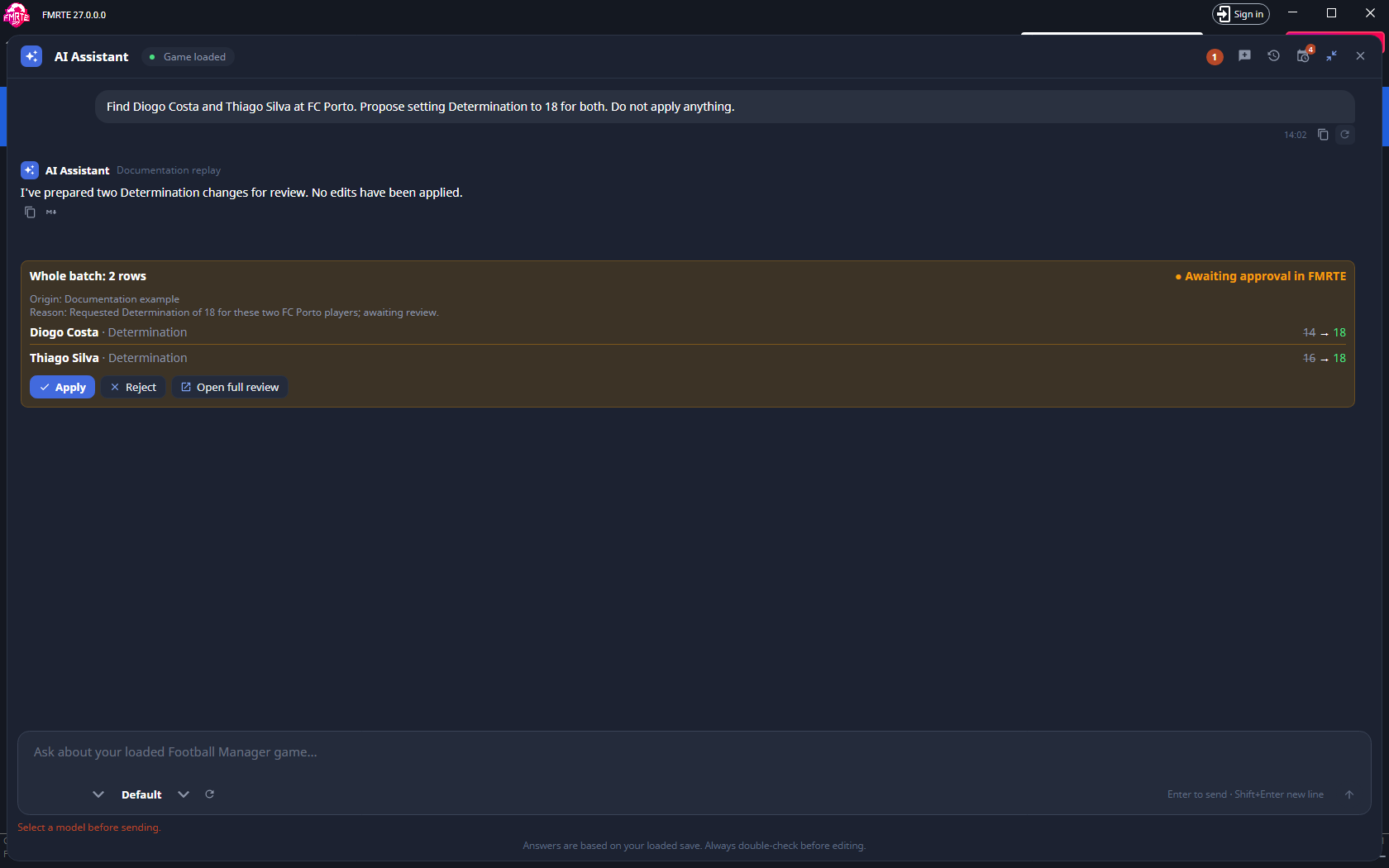
The conversation in this screenshot is a documentation replay, and its proposal was never applied. Your provider's wording and your save's values will differ.
| Control in chat | What it does |
|---|---|
| Apply | Approves the ready operations in the proposal's current revision. Use it only after checking the targets and changes you intend to approve. |
| Reject | Rejects the proposal without applying its edits. |
| Open full review | Opens Review changes in a separate FMRTE workspace tab. Opening it does not apply edits. Use this view to inspect all changes and choose a subset. |
Approve selected changes in the review tab
- Select Open full review in the chat. The chat folds away so you can inspect the tab.
- Check the target names, field names, old and new values, reason and validation messages.
- Use Clear selection, then select only the changes you want. Select entity selects that record's eligible changes. Select all eligible selects all eligible operations.
- Check the summary line, such as 1 operations · 1 entities · 1 changes selected. Search entities or changes filters what is displayed. It does not clear selections hidden by the filter.
- Select Confirm and apply N changes only when the selection and count are correct.
- Read Application results. Each change shows Applied, Already set, Not attempted, Failed or Unknown. Check the affected values in FMRTE and Football Manager.
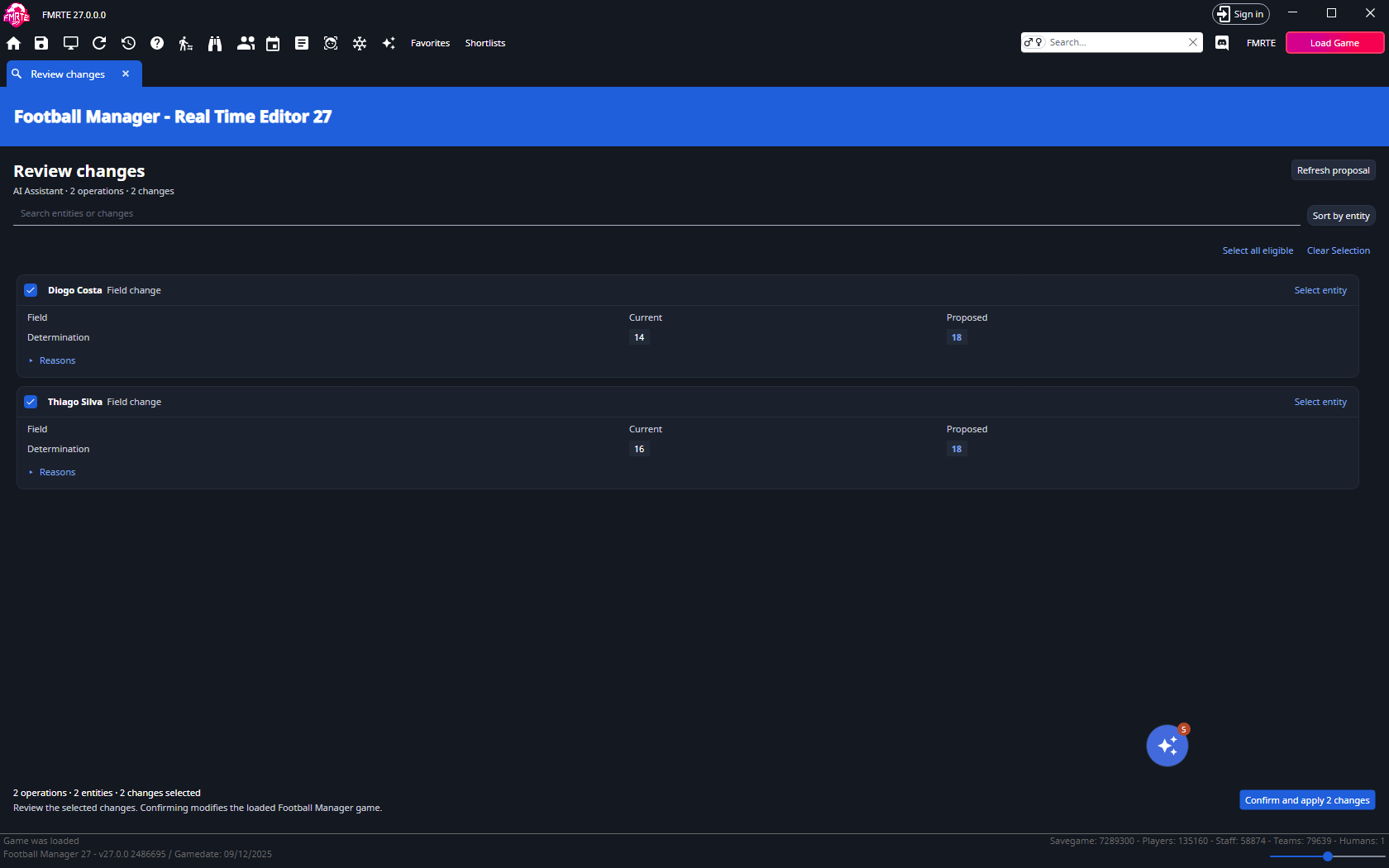
For a complete walkthrough that proposes two changes and approves only one, follow Review and approve AI edits.
Limits and results
- A proposal expires after ten minutes or when the save unloads. Refresh proposal creates a new revision that needs another review. An attempted proposal must be prepared again before you retry.
- Approved edits are written only while Football Manager is running and your FMRTE license is valid. Otherwise the changes are not applied.
- Select Stop in the review tab to stop a run. Stopping can leave a partly applied operation.
- A failed target is skipped and the run continues. An Unknown result means FMRTE cannot tell whether the write happened, and it stops the remaining changes.
- Use Edit History to inspect recorded writes. Only eligible values can be undone.