Open in
Remove Brexit
Add the European Union agreement back to England, so Football Manager treats England as an EU member again. Clubs in England then stop needing work permits for players the game treats as EU nationals.
Before you start
You need a loaded savegame and an activated license.
Football Manager has no Brexit switch. It counts a nation as an EU member while the nation has a European Union row under Agreements that is in force on the current in-game day. In the standard database, England has no European Union row, so every foreign player at an English club needs a work permit.
Each home nation has its own agreements. This example edits England, which covers clubs in England. For clubs in Scotland or Wales, repeat it on that nation.
Add the agreement
- Find England with the search box and open its Information page.
- Under Agreements, select +. FMRTE adds a row at once. It copies another nation's agreement, so the new row may not say European Union yet.
- In the new row, choose European Union from the list.
- Leave From and Until empty, so both boxes read No limit. The row's status shows Active.
- Select Save Changes.
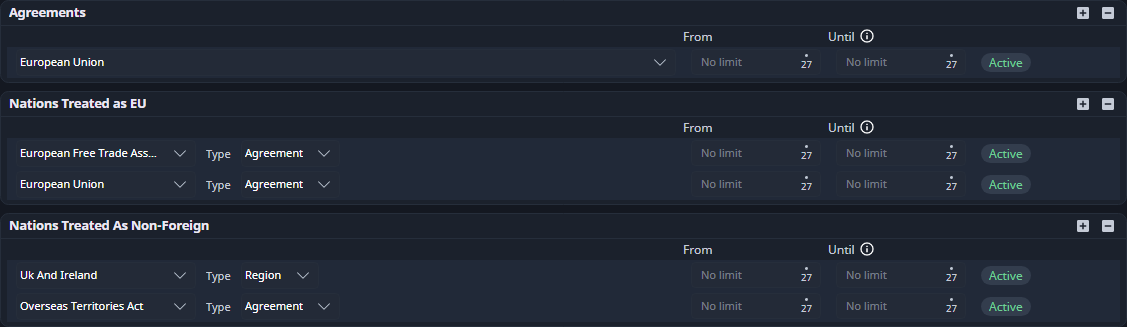
A row with a date only counts between its dates. If the status reads From a date (amber) or Ended a date (grey), Football Manager ignores the row today. Clear the dates and save again.
Check the result
- Reopen England's Information page. The European Union row should still show Active.
- Search for England and press Enter to open the full results. EU Member should read Yes.
- Under Nations treated as EU, check that the list includes the European Union. In the standard database England's list already does. If it is empty, the EU row alone may not exempt EU players.
- In Football Manager, open an English club and check whether an EU player still needs a work permit.
- Save in Football Manager to keep the change in your save file.
Undo it
- Open England's Information page.
- Select the European Union row under Agreements, then select -.
- If FMRTE asks, confirm the removal.
The removal is written straight away. Like adding, it is recorded in Edit History but can't be undone there. To end the agreement from a later date instead, set that date in Until and select Save Changes.
If it did not work
- EU Member still reads No: the row is not in force today. Check its agreement is European Union and its status is Active.
- A player at a club in Scotland or Wales still needs a permit: repeat these steps on that nation.
- The change is gone after reloading: save in Football Manager after editing, then follow the saving checks.
Related options
- Agreements and nationality treatment on the nation page.
- Registration, work permits and nationality for a single player's eligibility.