Open in
Installing newgen and staff facepacks
Facepack Installer links images to people in your savegame through a config.xml file. It is free, but you must supply the facepack, it does not generate images.
It can also copy the facepack and its completed configuration into Football Manager's graphics folder. You do not need to create the image mappings manually.
Supported facepacks
FMRTE recognises these facepack types automatically when you select their folder:
| Facepack type | What to select and expect |
|---|---|
| NewGAN-compatible packs | Select the folder containing the pack's original nation/ethnicity subfolders. FMRTE detects it as Newgan Compatible and uses the person's nation and ethnicity when choosing a face. |
| URAN (Ultra Realistic NewGAN) | Keep the original folder layout, including the available players/male, staff/male and staff/female folders. Detected as URAN Compatible. |
| Newgen Revolution | Keep the pack's original region/nation folders and any supplied Staff folder. Detected as Newgen Revolution Compatible. |
| NG Regens | Keep the original folder structure. FMRTE uses the pack's nation/ethnicity profiles for male and female players and staff, where the corresponding images are supplied. Detected as NG Regens Compatible. |
| Generic image folders | Select a folder with .png or .jpg images directly inside it. Detected as Generic. Images are assigned randomly, without nation or ethnicity matching, subfolders are not scanned for this type. |
For a structured pack, select the extracted pack's root folder, keeping its subfolder names and layout intact. Selecting an individual image subfolder may make it appear as Generic, which loses the pack-specific matching.
FMRTE does not include these packs.
Before installing
Load your savegame, then download and extract a supported facepack. Choose the extracted folder, not the ZIP or other archive. Make sure the pack contains images suitable for the players or staff you plan to select.
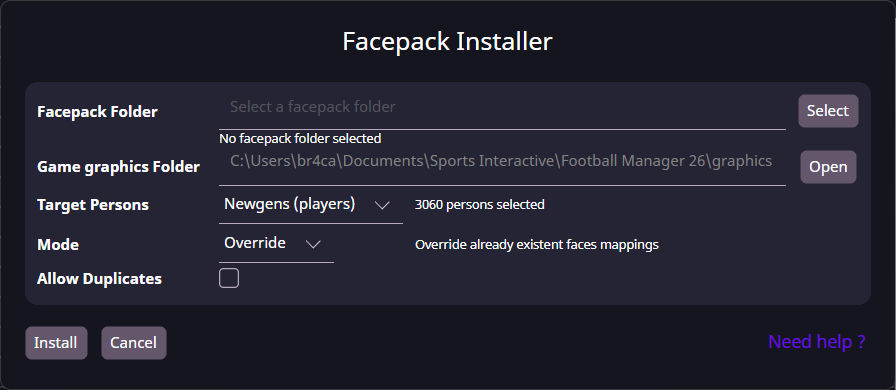
Install a facepack
- Open Facepack Installer from the toolbar.
- Select Facepack Folder and check the detected type and face count. If it says No facepack found, check the folder against the supported formats above.
- Check Game graphics Folder. Use Open to inspect the destination.
- If the pack is outside that folder, select Copy to game graphics folder, or plan to copy the finished pack there yourself. This option appears after a pack is detected and a copy is needed.
- Choose Target Persons and check the selected-person count. Use Custom → Customize to filter a smaller group.
- Choose Mode and whether to Allow Duplicates, as explained below.
- Select Install. Wait while FMRTE creates or updates
config.xmland, if selected, copies the facepack. - Read the installation summary, including installed faces, preserved faces, people without a face and any copying result.
- If you did not use automatic copying, place the images and completed
config.xmltogether in the game's graphics folder, preserving the pack's subfolders. - Refresh the graphics in Football Manager and check a selected person's profile.
Automatic copying places the pack in a save-specific FMRTE-Faces-… subfolder inside Game graphics Folder. Check the reported destination if you need to locate it.
Target persons
Target Persons determines which people in the loaded savegame receive faces:
| Choice | People selected |
|---|---|
| Newgens (players) | Generated players. This does not select generated staff. |
| Human teams (players) | Players in teams controlled by human managers. |
| All players | All players in the loaded game. |
| All male players / All female players | Players of the selected gender. |
| All staff | Staff members, excluding human managers. |
| All male staff / All female staff | Staff of the selected gender, excluding human managers. |
| All players and staff | Both groups, excluding human managers. |
| Custom | Players or staff matching the filters you choose through Customize, using Advanced Search. |
The selection does not guarantee that the pack has a suitable image for every person. Check the detected face counts and the installation summary.
Installation modes
Mode controls the mappings in the selected facepack's config.xml:
| Mode | Effect |
|---|---|
| Preserve | Keep existing mappings and assign faces only to selected people who do not already have a mapping in this file. |
| Override but preserve missing persons | Replace mappings for the selected people, while retaining mappings for people outside the current selection. |
| Override | Clear all existing mappings in this file, then create new mappings for the selected people. Mappings outside the selection are also removed. |
Here, missing persons means people with an existing mapping who are not in your current Target Persons selection. It does not mean people whose image files are missing.
These modes apply to this pack's configuration, not every facepack installed in Football Manager.
Allow duplicates
Allow Duplicates lets FMRTE reuse an image for more than one person. Leave it off to use each newly assigned image once during the current installation, or enable it when the pack does not have enough suitable images for everyone selected.
With structured packs, a matching category can run out of faces even when the pack's total face count is larger than the selected-person count. People who cannot be assigned a suitable image are counted in the summary as selected persons who did not get a face.
Make FM26 load the new mapping
After installation, clear Football Manager's graphics cache and reload the skin if your game provides those controls. Then reopen a selected person's profile to check the face.
If your FM26 version does not offer those controls, restarting the game is a diagnostic step, a universal refresh sequence for FM26 is not yet confirmed.
If the face remains missing, check the files below before reinstalling with Override.
Add more faces later
After new players appear in your savegame, load the updated game into FMRTE and select the same facepack folder. Choose Newgens (players) and Preserve to add faces while keeping existing mappings.
To replace faces for a particular group while retaining everyone else's mappings, use Custom → Customize with Override but preserve missing persons. Compare installed, preserved and missing-face totals after each update.
Troubleshooting
No facepack found, or the wrong pack type is detected
Check that the archive is fully extracted and that you selected the correct folder. Structured packs need their original folder layout, a generic pack needs .png or .jpg files directly in the selected folder.
If a structured pack is detected as Generic, select its root folder instead of a subfolder containing individual images. Check the detected type again before installing.
Game graphics Folder is blank, missing or wrong
The destination comes from the running game's user-data folder plus graphics. It is read-only. Facepack Folder is the source pack, not the destination.
- Load the correct savegame in both apps and reopen the installer.
- Use Open to check the destination, especially with redirected Documents or a custom user-data location.
- Create a
graphicssubfolder there if it is missing. - Keep the extracted images and completed
config.xmltogether inside it.
If the destination is blank or points to another installation, report both paths. Changing the install mode does not fix a wrong folder.
Italmed, SAMed or a dictionary-key error
Update FMRTE and check that the pack is supported and fully extracted. If the error remains, report its exact text, pack name, detection result and install mode. Deleting config.xml is not a general fix.
Installation succeeded, but the face is still missing
Check one person from start to finish:
| Check | What must match |
|---|---|
| Person | The unique ID in the loaded savegame |
| Mapping | That ID in config.xml |
| Image | The mapped file exists relative to the config file |
| Destination | The pack is inside this game's graphics folder |
| Display | Football Manager has refreshed the graphics |
Installation totals describe the files processed, not whether Football Manager displayed them.