Open in
Editing competitions
Use Information to edit competition details, VAR settings and standings, and Prize Money to change or add rewards.
Basic editing
Open the competition's Information page to edit these fields:
| Field | What you can change |
|---|---|
| Reputation | The competition's reputation, from 1–200. |
| Foreground Colour, Background Colour and Trim Colour | The competition's colours. Select a colour to open the colour picker. |
| Winter Ball Colour, Winter Ball Startdate and Winter Ball Enddate | The winter ball's colour and the dates it is used. |
| Substitution Rules | The substitution rule to use for the competition. Do Not Override Sub Rules leaves the existing rules in place. |
Substitution-rule changes apply to new fixtures. To apply an override to matches that are already scheduled, also select Update existing scheduled games.
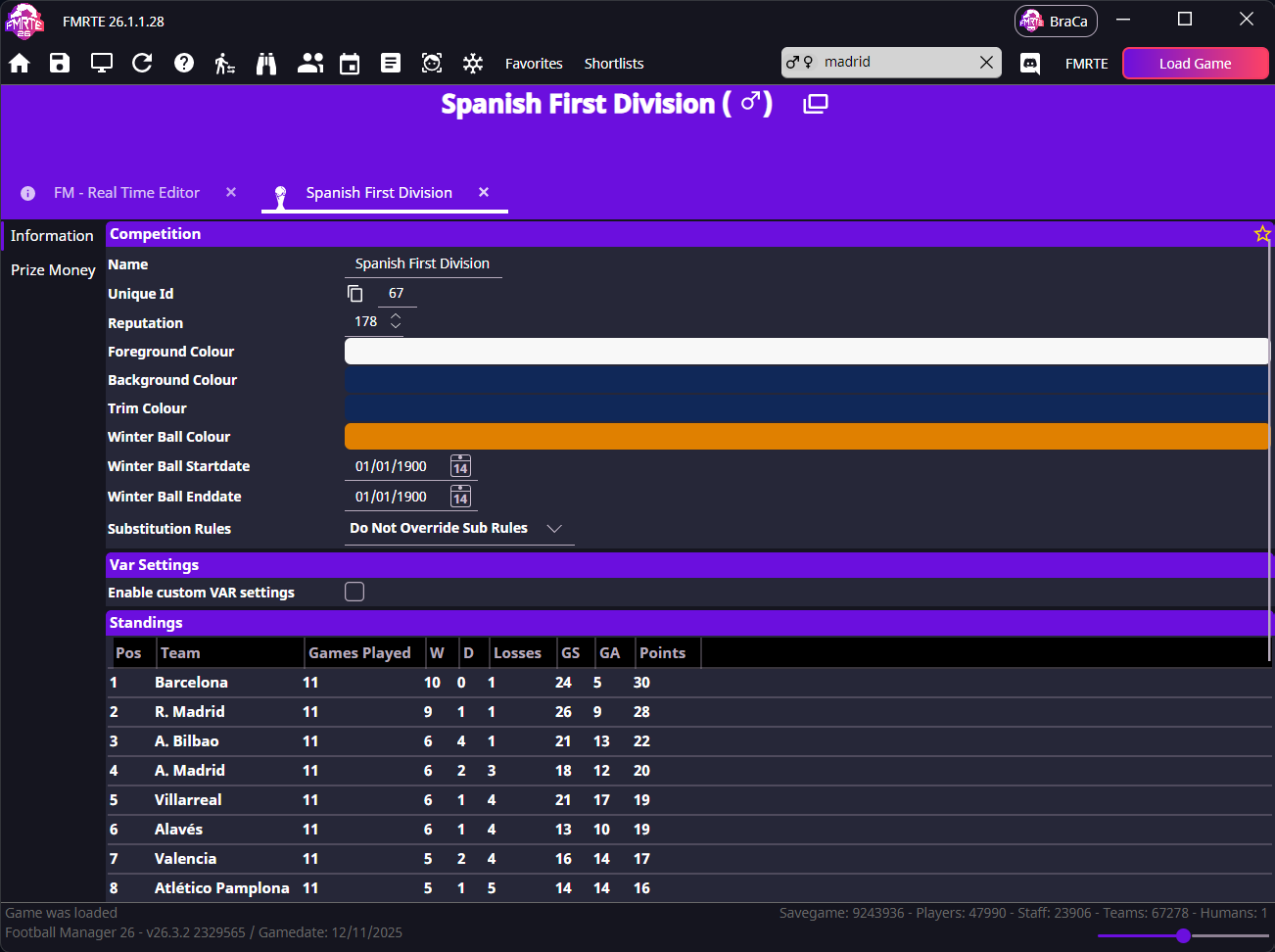
Select Save Changes after editing. Reopen the competition to check the saved values, and save in Football Manager to keep the edits in your savegame.
Worked example: raise reputation by one point
Change Reputation from 150 to 151, then select Save Changes. Reopen Information and check that it shows 151.
VAR settings
Under Var Settings, select Enable custom VAR settings to choose the competition's video assistant referee (VAR) option. When VAR is enabled, you can also set its start date and limit it to televised matches. Select Save Changes to apply your choices.
Standings
The Standings table on Information is editable. Choose the relevant stage first if the competition shows a stage selector.
You can change a team's Games Played, wins (W), draws (D), Losses, goals scored (GS), goals against (GA) and Points. Edit the values in the team's row, then select Save Changes.
Pos is read-only. Football Manager repositions teams based on the edited totals and the competition's ranking rules. To change where a team sits in the table, adjust its totals, you cannot enter its position directly. Check the updated table in Football Manager after saving.
For example, to deduct three points from a team with 30, change Points to 27. Keep the other totals as they are unless you also intend to change them. Editing standings does not rewrite individual match results.
Prize money
Open Prize Money to edit existing awards or add prize money to a league that currently has none. Select the relevant stage if a stage selector is shown.
| Setting | What it controls |
|---|---|
| Prize Money Per Win, Prize Money Per Draw and Prize Money Per Defeat | The award for each match outcome. |
| Classification Prize Money | The award for each finishing position in the league. |
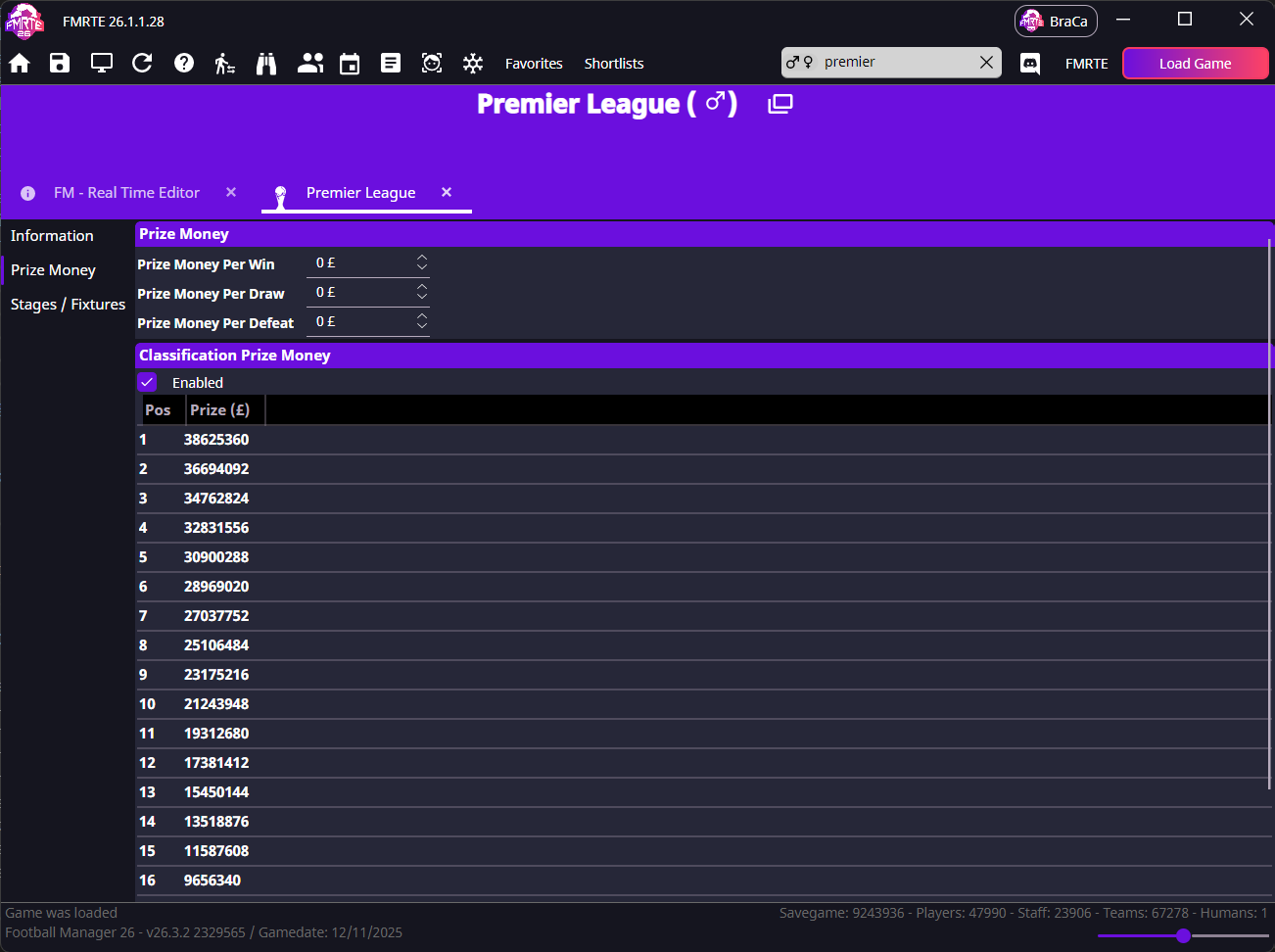
To add classification prizes to a league with none:
- Select Enabled under Classification Prize Money. FMRTE creates the position rows.
- Enter the award in the Prize column for each position you want to reward.
- Set any per-win, per-draw or per-defeat awards you want to add.
- Select Save Changes, then reopen Prize Money to check the amounts.
For a league with existing prizes, edit the amounts in the same fields and save. Amounts use your selected currency setting.
Fixtures (advanced feature)
Stages / Fixtures lets you edit upcoming fixtures after enabling the feature in Settings. Follow Editing fixtures for setup, league/group/cup editing steps and the limits that affect the result.